In the Previous Post
In the previous article, we introduced Java Scripting API and basic usage for running JavaScript from Java.
- Previous post: “Java Scripting API: Calling JavaScript Functions from Java”
In this article, we focus on:
Bindingsfor storing and reading script stateScriptContextfor connecting Java code and the JavaScript engine
Bindings and Scope
In earlier examples, you used ScriptEngine.put and ScriptEngine.get
to access values across script execution boundaries, similar to a global Map.
// store the string value "madplay" under name "myName"
engine.put("myName", "madplay");

// execute script; if myName is "madplay", assign "kimtaeng"
engine.eval("var yourName = ''; if (myName === 'madplay') yourName = 'kimtaeng'");

// read value from script context
System.out.println("Your name: " + engine.get("yourName"));
This state handling is provided by implementations of the Scripting API Bindings interface.
Bindings extends java.util.Map, so it is key/value based.
If you inspect put internals in a ScriptEngine implementation,
you can see branching by scope.
Based on the passed scope, it reads bindings with that scope from ScriptContext.
setBindings follows a similar pattern.
public Bindings getBindings(int scope) {
    if (scope == ScriptContext.GLOBAL_SCOPE) {
        return context.getBindings(ScriptContext.GLOBAL_SCOPE);
    } else if (scope == ScriptContext.ENGINE_SCOPE) {
        return context.getBindings(ScriptContext.ENGINE_SCOPE);
    } else {
        throw new IllegalArgumentException("Invalid scope value.");
    }
}
As shown, ScriptEngine delegates to ScriptContext.
ScriptContext is the component that wires Java applications and script engines together,
so Java and script code can work as one execution flow.
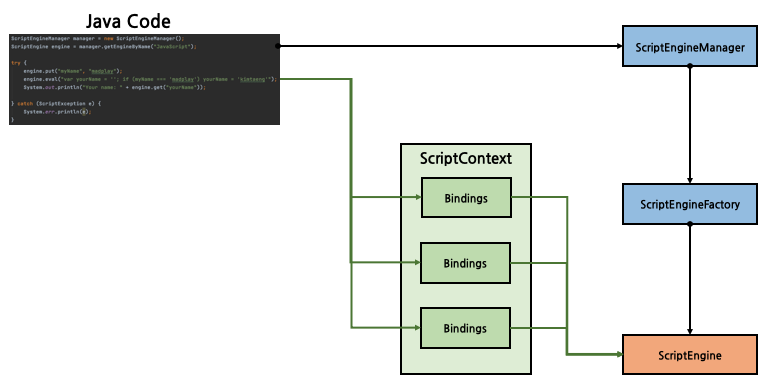
This setup controls visibility of bound values. With global scope, values are visible to all script engines. With engine scope, values are visible only to that engine.
By default, ScriptEngineManager initializes global bindings.
Its setBindings/getBindings methods apply to global scope.
ScriptEngine also provides setBindings/getBindings,
with explicit scope parameters, so you can choose scope directly.
That allows stateful script execution with controlled binding contexts.
ScriptEngineManager manager = new ScriptEngineManager();
ScriptEngine engine = manager.getEngineByName("JavaScript");

try {
    engine.put("myName", "madplay");
    engine.eval("var yourName = ''; " +
            "if (myName === 'madplay') yourName = 'kimtaeng';" +
            "else yourName = 'madplay';");
    System.out.println("Your name: " + engine.get("yourName"));
    System.out.println("----------");

    // get current engine bindings
    Bindings oldBindings = engine.getBindings(ScriptContext.ENGINE_SCOPE);

    // create new bindings and set new state
    Bindings newBindings = engine.createBindings();
    newBindings.put("myName", "kimtaeng");

    // replace current bindings
    engine.setBindings(newBindings, ScriptContext.ENGINE_SCOPE);

    engine.eval("var yourName = ''; " +
            "if (myName === 'madplay') yourName = 'kimtaeng';" +
            "else yourName = 'madplay';");
    System.out.println("Your name: " + engine.get("yourName"));
    System.out.println("----------");

} catch (ScriptException e) {
    System.err.println(e);
}
Output:
Your name: kimtaeng
----------
Your name: madplay
Another option is passing a bindings object directly to eval.
Then the state is maintained in that specific bindings object.
ScriptEngineManager manager = new ScriptEngineManager();
ScriptEngine engine = manager.getEngineByName("JavaScript");

// create a bindings object and set initial state
Bindings newBindings = engine.createBindings();
newBindings.put("myName", "madplay");

try {
    // pass bindings directly to eval
    engine.eval("var yourName = ''; " +
            "if (myName === 'madplay') yourName = 'kimtaeng';" +
            "else yourName = 'madplay';", newBindings);

    // read value from custom bindings
    System.out.println("Your name: " + newBindings.get("yourName"));

    // read from engine default bindings
    System.out.println("Your name(engine): " + engine.get("yourName"));
} catch (ScriptException e) {
    System.err.println(e);
}
Output shows yourName stored in the passed bindings,
while engine default bindings remain unchanged.
Your name: kimtaeng
Your name(engine): null
ScriptContext
While reviewing bindings, we saw this ScriptEngine delegation pattern:
public Bindings getBindings(int scope) {
    if (scope == ScriptContext.GLOBAL_SCOPE) {
        return context.getBindings(ScriptContext.GLOBAL_SCOPE);
    } else if (scope == ScriptContext.ENGINE_SCOPE) {
        return context.getBindings(ScriptContext.ENGINE_SCOPE);
    } else {
        throw new IllegalArgumentException("Invalid scope value.");
    }
}
ScriptContext connects Java programs and script engines.
It exposes bindings to the engine and also provides Reader/Writer
for script engine I/O.
The default implementation SimpleScriptContext initializes bindings,
uses InputStreamReader(System.in) for input,
and PrintWriter(System.out/System.err) for output and error output.
public SimpleScriptContext() {
    this(new InputStreamReader(System.in),
            new PrintWriter(System.out , true),
            new PrintWriter(System.err, true));
    engineScope = new SimpleBindings();
    globalScope = null;
}
Because these streams are instance fields in ScriptContext,
you can customize them with getters/setters.
Example: redirect standard output.
ScriptEngineManager manager = new ScriptEngineManager();
ScriptEngine engine = manager.getEngineByName("JavaScript");

// get context
ScriptContext context = engine.getContext();

// use try-with-resources
try (StringWriter writer = new StringWriter()) {

    // result differs depending on whether this line is enabled
    context.setWriter(writer);

    engine.eval("print ('hello! madplay :) ');");
    StringBuffer buffer = writer.getBuffer();

    System.out.println("StringBuffer: " + buffer.toString());
} catch (ScriptException | IOException e) {
    System.err.println(e);
}
Output:
# when setWriter is commented out
hello! madplay :)
StringBuffer:

# when setWriter is enabled
StringBuffer: hello! madplay :)
Since ScriptEngine exposes context getters/setters,
you can save or replace context before/after execution.
If context wiring feels verbose, pass ScriptContext directly
as the second parameter of eval, similar to bindings.
Then execution uses the provided context without mutating the engine’s default context.
Improving Script Execution Performance
Inside eval, a script engine implementation typically parses script text,
compiles/transforms it to executable form, and runs it.
That means parse/compile work repeats on every execution. If you repeatedly run the same script, performance degrades due to repeated compilation steps.
Java Scripting API provides an alternative via Compilable.
Compile once, then execute the compiled form repeatedly.
Example with timing comparison:
ScriptEngineManager manager = new ScriptEngineManager();
ScriptEngine engine = manager.getEngineByName("JavaScript");
final int MAX_LOOP_COUNT = 100_000;

try {
    // read script file
    String script = Files.readAllLines(Paths.get(
            ClassLoader.getSystemResource("sample_script.js").toURI())
    ).stream().collect(Collectors.joining("\n"));

    // execute with plain eval
    long start = System.nanoTime();
    for (int i = 0; i < MAX_LOOP_COUNT; i++) {
        engine.eval(script);
    }
    long end = System.nanoTime();
    System.out.printf("script: %d ms\n", TimeUnit.MILLISECONDS.convert(
            end - start, TimeUnit.NANOSECONDS));


    // verify Compilable support first
    if (!(engine instanceof Compilable)) {
        System.err.println("Compilable interface is not available");
    }
    Compilable compilable = (Compilable) engine;
    CompiledScript compiledScript = compilable.compile(script);

    // execute compiled script
    start = System.nanoTime();
    for (int i = 0; i < MAX_LOOP_COUNT; i++) {
        compiledScript.eval();
    }
    end = System.nanoTime();
    System.out.printf("compiled script: %d ms\n", TimeUnit.MILLISECONDS.convert(
            end - start, TimeUnit.NANOSECONDS));


} catch (Exception e) {
    System.err.println(e);
}
Compilable.compile turns script text into intermediate compiled form
and returns CompiledScript.
As with Invocable, check support before use,
because not every engine implements Compilable.
CompiledScript also has eval,
but unlike plain ScriptEngine.eval, it skips parse/compile on each run.
Measured result:
script: 5734 ms
compiled script: 108 ms
The performance gap is significant for repeated execution.
Next Article
So far, we covered Java Scripting API for executing JavaScript from Java,
including bindings, context, and performance optimization.
Next, we look at a practical alternative for Nashorn, which is deprecated since Java 11.
All sample source code is available at GitHub repository (link).