What is the Observer Pattern?
It refers to a method where when an object’s state changes, other objects that depend on it are notified of the change and content is automatically updated. Usually, there are Subject objects that have state and Observer objects that need to know about changes, and they have a 1-to-N relationship. That is, one subject can have one or more observers.
Example
Understanding the Observer Pattern through the relationship between press companies and subscribers. Every morning when new news is published, newspapers are delivered to subscribers. Taking internet newspapers as an example, when new articles are posted on the homepage, notifications can be sent to subscribers that new articles have been updated.
Like this, subscribers who want to see new news can subscribe to press companies that provide information to immediately know when articles are published, and if information is no longer needed, they can unsubscribe from press companies to not receive notifications about article publication or newspaper delivery.
Applying this to the Observer Pattern, press companies become subjects (Subject) that provide information, and subscribers become observers (Observer).
Structure of Observer Pattern
Below is a class diagram expressing the Observer Pattern.
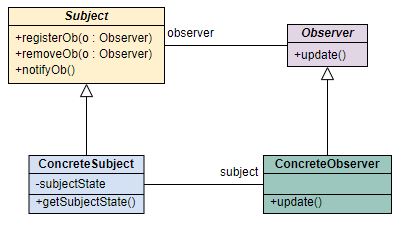
Examining what role each plays. Depending on implementation methods, method naming or existence may differ.
Subject
It’s an interface representing the subject. When you want to register observers in objects or remove them from observer lists, you can use this interface’s methods.
Naming may differ by example, but in the class diagram, it’s defined as registerOb, removeOb.
ConcreteSubject
It’s a concrete class that plays the subject role. It must implement (implements) the Subject interface, and besides methods that can register or unsubscribe observers,
there’s a method that can notify all observers whenever the subject’s state changes. In the class diagram, it’s defined as notifyOb.
Depending on implementation methods, member fields representing information may differ. And there may or may not be accessor (getter) methods and
mutator (setter) methods to get this information. New information may be passed simultaneously when update is called.
Observer
It’s an observer interface that receives change notifications. Observers must implement this interface. When the state of the observed subject changes,
the update method is called.
ConcreteObserver
If you implement only the Observer interface, anything can become an observer. Each observer can register with specific subject objects to receive change notifications.
Changed information is checked through ConcreteSubject’s accessors or received through the update method.
Implementing Observer Pattern
Now implementing the Observer Pattern. There are Subscribers that play the observer role and Press that plays the changing subject role.
Subject Interface
public interface Subject {
    void registerOb(Observer o);
    void removeOb(Observer o);
    void notifyOb();
}
ConcreteSubject Implementation
import java.util.ArrayList;
import java.util.List;

/**
 * Plays the ConcreateSubject role.
 * @author madplay
 */
public class Press implements Subject {
    private String newsTitle;
    private List<Observer> observers;

    public Press() {
        this.observers = new ArrayList<>();
    }

    @Override
    public void registerOb(Observer o) {
        observers.add(o);
    }

    @Override
    public void removeOb(Observer o) {
        int index = observers.indexOf(o);
        if (index >= 0) {
            observers.remove(index);
        }
    }

    @Override
    public void notifyOb() {
        for (Observer o : observers) {
            o.update(newsTitle);
        }
    }

    public void setNewNewsTitle(String newsTitle) {
        this.newsTitle = newsTitle;
        notifyOb();
    }
}
Observer Implementation
public interface Observer {
    void update(String newsTitle);
}
ConcreteObserver Implementation
/**
 * Plays the ConcreateObserver role.
 * @author madplay
 */
public class NewsSubscriber implements Observer {

    Subject subject;

    public NewsSubscriber(Subject subject) {
        this.subject = subject;
        subject.registerOb(this);
    }

    @Override
    public void update(String newsTitle) {
        System.out.println("New general article title: " + newsTitle);
        System.out.println("Update complete.");
    }

    public void unsubscribe() {
        subject.removeOb(this);
    }
}
Running It
/**
 * Observer Pattern Test Code
 */
public class ObserverPatternTester {

    public static void main(String[] args) {
        Press press = new Press();
        NewsSubscriber newsSubscriber = new NewsSubscriber(press);
        press.setNewNewsTitle("Today's weather is very warm.");
        newsSubscriber.unsubscribe();
    }
}
Checking the results through test code:
New general article title: Today's weather is very warm.
Update complete.
push vs pull
The Observer Pattern we examined earlier was a push method where the subject object, the change target, passes data to observers whenever changes occur. Conversely, it can also be implemented as a pull method where observers fetch data.
For example implementation, this time we’ll use the Observer Pattern built into JDK. We’ll use the Observer and Observable classes in the java.util package.
For reference, these were Deprecated in Java 9, and use of the Flow API is recommended.
Subject Implementation
Unlike the push method we examined earlier, there’s no need to define an interface. Just extend the java.util.Observable class.
import java.util.Observable;

public class Press extends Observable {
    private String newsTitle;

    public Press() {
        // No need for a list to store observers.
    }

    public void newsUpdated() {
        // Observable's method that recognizes that state has changed.
        setChanged();

        // No parameters are passed. That is, it's a pull method.
        notifyObservers();
    }

    public void setNewsTitle(String newsTitle) {
        this.newsTitle = newsTitle;
        newsUpdated();
    }

    public String getNewsTitle() {
        return newsTitle;
    }
}
Examining a few things. First, constructors no longer need lists to manage observers.
Also, looking at the notifyObservers method, you can see there are no parameters passed. That is, it uses the pull method.
On the other hand, there’s a method called setChanged, which is a flag method that checks whether state has changed. Before notifyObservers is called,
this method must be called first.
Observer Implementation
When implementing observers, unlike the push method, you don’t need to create an observer interface. Just implement the java.util.Observer interface.
import java.util.Observable;
import java.util.Observer;

public class NewsSubsriber implements Observer {
    private Observable observable;
    private String name;
    private String newsTitle;

    public NewsSubsriber(String name, Observable observable) {
        this.name = name;
        this.observable = observable;
        observable.addObserver(this);
    }

    @Override
    public void update(Observable o, Object arg) {
        if(o instanceof Press) {
            Press press = (Press) o;
            this.newsTitle = press.getNewsTitle();
            System.out.printf("Subscriber name: %s / Article title: %s\n", name, newsTitle);
        }
    }
}
Running It
public class ObserverPatterTest {
    public static void main(String[] args) {
        Press press = new Press();
        NewsSubsriber subscriber1 = new NewsSubsriber("Person1", press);
        NewsSubsriber subscriber2 = new NewsSubsriber("Person2", press);
        NewsSubsriber subscriber3 = new NewsSubsriber("Person3", press);
        press.setNewsTitle("Today's weather is very warm.");
        press.setNewsTitle("Will tomorrow's weather also be very warm?");
    }
}
Subscriber name: Person3 / Article title: Today's weather is very warm.
Subscriber name: Person2 / Article title: Today's weather is very warm.
Subscriber name: Person1 / Article title: Today's weather is very warm.
Subscriber name: Person3 / Article title: Will tomorrow's weather also be very warm?
Subscriber name: Person2 / Article title: Will tomorrow's weather also be very warm?
Subscriber name: Person1 / Article title: Will tomorrow's weather also be very warm?
Problems with Built-in Observer Pattern
It runs well, but as mentioned earlier, these codes have quite a few regrettable points for use.
First, Observable is a class, not an interface. Therefore, you must extend (extends) it to create sub classes.
Direct functionality addition is impossible. It also violates design principles of using composition rather than inheritance.
This imposes constraints on reuse, and internal methods are protected access modifiers, so they can’t be called externally.
As a result, use of the Flow API is recommended for reactive-style programming.