Synchronization? What Is It?
Synchronization refers to matching execution timing between tasks. When using implementation classes of Collections like List, Set, and Map in Java, this synchronization can become an important issue. Things that provide synchronization aren’t unconditionally good, but because there are performance differences in terms of execution speed, it’s good to use them appropriately depending on the situation.
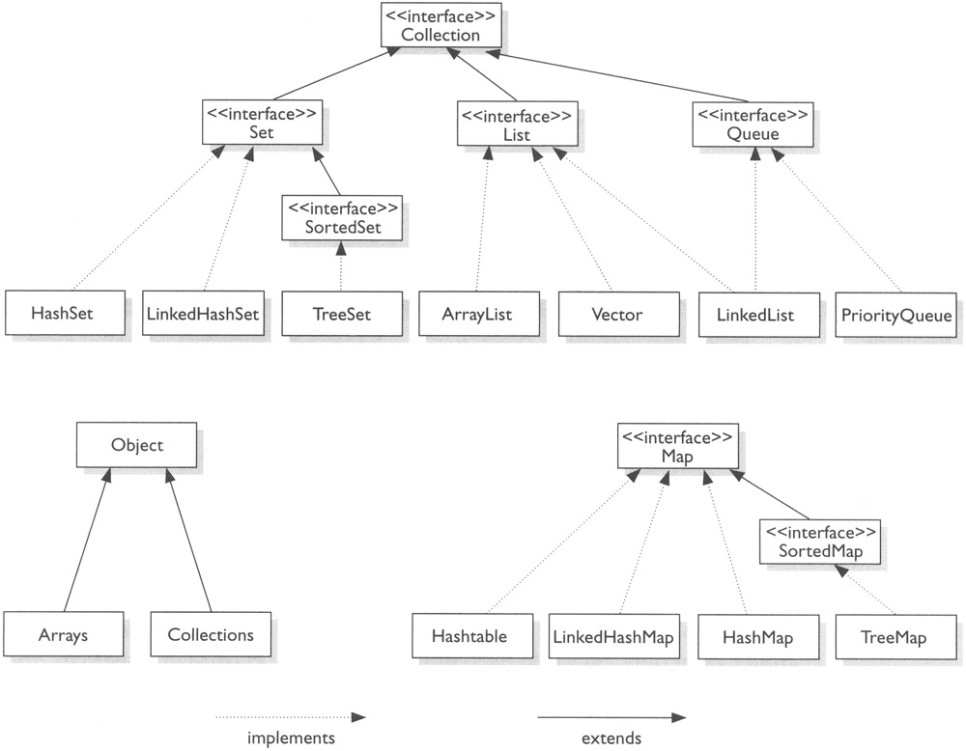
As shown in the figure above, Java provides numerous implementation classes of the Collection interface. Since there are too many, examining List, Set, and Map as representatives.
List
List is inherently ordered and allows duplication of elements added to the list. As can be seen in the figure above, classes that implement the List interface include ArrayList, Vector, and LinkedList.
First, examining ArrayList.
If you enter the internal implementation code of the ArrayList class in IDE tools like Eclipse or Intellij,
you can see code like below.
package java.util;

public class ArrayList<E> extends AbstractList<E>
        implements List<E>, RandomAccess, Cloneable, java.io.Serializable {
    ...
    public boolean add(E e) {
        ensureCapacityInternal(size + 1);  // Increments modCount!!
        elementData[size++] = e;
        return true;
    }
    ...
}
The ArrayList class does not provide synchronization.
As you can see by examining the add method that adds elements above, there’s no code for synchronization.
Next, examining Vector.
package java.util;

public class Vector<E> extends AbstractList<E>
    implements List<E>, RandomAccess, Cloneable, java.io.Serializable {
    ...
    public synchronized boolean add(E e) {
            modCount++;
            ensureCapacityHelper(elementCount + 1);
            elementData[elementCount++] = e;
            return true;
    }
    ...
}
You can see a clear difference just from the code, right? In the Vector class, you can see the
synchronized keyword provided in Java in the add method that adds elements. That is, synchronization is guaranteed internally when element insertion operations proceed in Vector.
The ArrayList class we examined first can also be changed as follows if synchronization is needed.
/*
* ArrayList Synchronization
*
* https://docs.oracle.com/javase/6/docs/api/java/util/Collections.html#synchronizedList(java.util.List)
* @author kimtaeng
*/
public void SomeMethod() {
    List<String> synchronizedList = Collections.synchronizedList(new ArrayList<String>());
    synchronizedList.add("MadPlay");
    synchronizedList.add("MadPlay");
    synchronizedList.add("Kimtaeng");

    synchronized(synchronizedList) {
          Iterator i = synchronizedList.iterator(); // Must be in synchronized block
          while (i.hasNext()) {
              foo(i.next());
          }
    }
}
In addition to ArrayList and Vector, there’s also LinkedList.
Since it’s a structure where data nodes are connected and arranged in order, when adding or deleting values between nodes,
you only need to change connected link values, so performance for operations is relatively fast.
In the case of ArrayList and Vector we examined earlier, since they have indices, which are position information of elements, they have the advantage of being able to access specific positions, but when proceeding with data addition, they use methods of creating temporary arrays internally and then copying, so performance degradation occurs when performing operations that add large amounts of elements.
Set
Set is a collection of data that doesn’t maintain order, and unlike List we examined earlier, it doesn’t allow duplication of elements. Representative classes include HashSet and TreeSet.
Looking at the HashSet class, like ArrayList, it doesn’t provide synchronization. Also, it doesn’t guarantee the order of added elements. It seems more accurate to say it has no meaning.
To assign order to elements added to Set, there’s LinkedHashSet introduced from JDK 1.4 version. You can see that this class’s constructor is a bit different from the HashSet class.
/* LinkedHashSet Class */
public class LinkedHashSet<E> extends HashSet<E>
    implements Set<E>, Cloneable, java.io.Serializable {

    ...

    public LinkedHashSet() {
        super(16, .75f, true);
    }
    ...
}
/* If we enter the parent class's constructor super, that is, HashSet's overloaded constructor */

public class HashSet<E> extends AbstractSet<E>
    implements Set<E>, Cloneable, java.io.Serializable {

    ...
    HashSet(int initialCapacity, float loadFactor, boolean dummy) {
        map = new LinkedHashMap<>(initialCapacity, loadFactor);
    }
    ...
}
So LinkedHashSet creates the parent class HashSet and internally creates LinkedHashMap. In the case of TreeSet, you can specify sorting methods to store in order.
import java.util.Comparator;
import java.util.Iterator;
import java.util.TreeSet;

/**
 * TreeSet Example
 *
 * @author kimtaeng
 * created on 2018. 4. 16.
 */
class MadPlay {
    public void collectionTest() {

        /* TreeSet sorted in ascending order */
        TreeSet<Integer> treeSet = new TreeSet<Integer>(new Comparator<Integer>() {
            @Override
            public int compare(Integer o1, Integer o2) {
                return o1 > o2 ? 1 : (o1 == o2 ? 0 : -1);
            }
        });

        treeSet.add(3); treeSet.add(1); treeSet.add(2);

        Iterator<Integer> iterator = treeSet.iterator();
        while (iterator.hasNext()) {
            System.out.println(iterator.next());
        }

        /* using Java 8 */
        TreeSet<Integer> java8TreeSet = new TreeSet<>(
                (o1, o2) -> o1 > o2 ? 1 : (o1 == o2 ? 0 : -1)
        );

        java8TreeSet.add(3); java8TreeSet.add(1); java8TreeSet.add(2);

        java8TreeSet.forEach(element -> {
            System.out.println(element);
        });
    }
}
The output of the above code will be output in sorted order <1, 2, 3>, different from the input order <3, 1, 2>.
Additionally, Sets that don’t provide synchronization can be converted like SynchronizedList we examined earlier.
/**
 * TreeSet to SynchronizedSet
 *
 * @author kimtaeng
 * created on 2018. 4. 16.
 */
public class MadPlay {
    public void collectionTest() {
        ...

        /* synchronizedSet */
        Set<Integer> synchronizedSet = Collections.synchronizedSet(treeSet);

        ...
    }
}
Map
Map stores data consisting of Key and Value pairs. There are HashMap, TreeMap, Hashtable classes, etc., and there’s also LinkedHashMap that guarantees order.
First, examining HashMap. It doesn’t allow duplication and doesn’t guarantee order.
It has the characteristic of allowing null as Key or Value values.
TreeMap, like HashMap, doesn’t allow duplication, but since it internally implements SortedMap, sorting occurs for Key values.
/* TreeMap Class */
public class TreeMap<K,V> extends AbstractMap<K,V>
    implements NavigableMap<K,V>, Cloneable, java.io.Serializable {
    ...
}

/* NavigableMap Interface */
public interface NavigableMap<K,V> extends SortedMap<K,V> {
    ...
}
Since sorting proceeds internally, relatively more time is consumed when adding values. Like TreeSet we examined earlier, you can also directly implement Comparator to specify sort order.
public void someMethod() {
    TreeMap<Integer, Integer> treeMap = new TreeMap<>(
            (o1, o2) -> o1 > o2 ? 1 : (o1 == o2 ? 0 : -1)
    );
}
Finally, Hashtable also doesn’t allow duplication, but unlike HashMap, it has the characteristic of
not allowing null as Key and Value values. It’s slower than HashMap but provides synchronization.
/* Hashtable Class */
public class Hashtable<K,V> extends Dictionary<K,V>
    implements Map<K,V>, Cloneable, java.io.Serializable {

    public synchronized V get(Object key) {
        Entry<?,?> tab[] = table;
        int hash = key.hashCode();
        int index = (hash & 0x7FFFFFFF) % tab.length;
        for (Entry<?,?> e = tab[index] ; e != null ; e = e.next) {
            if ((e.hash == hash) && e.key.equals(key)) {
                return (V)e.value;
            }
        }
        return null;
    }
}
In the case of HashMap, which doesn’t provide synchronization, issues may occur when iterating through KeySet while new values are added, but collections that support synchronization won’t have problems in such cases, right?
For Maps, you can also use Collections.SynchronizedMap method for synchronization functionality, but this time introducing a slightly different method.
Concurrent
The java.util.concurrent package that appeared from Java 1.5 version provides various concurrency features.
Java 1.5 API Docs
ConcurrentHashMap, which applies synchronization functionality to HashMap, belongs here.
You can use SynchronizedMap for synchronization, but the performance of ConcurrentHashMap we’ll examine now is better.
The reason is in the synchronization block scope. ConcurrentHashMap doesn’t lock the entire Map when proceeding with synchronization, but is implemented in a form that divides the Map into several pieces and partially locks them.
This characteristic shows more efficient performance in multi-thread environments. Testing if this is really true:
import java.util.Collections;
import java.util.HashMap;
import java.util.Hashtable;
import java.util.Map;
import java.util.concurrent.ConcurrentHashMap;
import java.util.concurrent.ExecutorService;
import java.util.concurrent.Executors;
import java.util.concurrent.TimeUnit;
import java.util.stream.IntStream;

/**
 * Hashtable, ConcurrentHashMap
 * SynchronizedMap Performance Test
 *
 * @author kimtaeng
 * created on 2018. 4. 16.
 */
class MadPlay {
    private final static int MAX_THREAD_POOL_SIZE = 5;
    private final static int MAX_TEST_COUNT = 5;
    private final static int MAX_OPERATE_COUNT = 100000;

    public static Map<String, Integer> testHashtable = null;
    public static Map<String, Integer> testSyncMap = null;
    public static Map<String, Integer> testConcMap = null;

    public static void collectionPerformTest() throws InterruptedException {
        testHashtable = new Hashtable<>();
        runSomethingTest(testHashtable);

        testConcMap = new ConcurrentHashMap<>();
        runSomethingTest(testConcMap);

        testSyncMap = Collections.synchronizedMap(new HashMap<>());
        runSomethingTest(testSyncMap);
    }

    public static void runSomethingTest(final Map<String, Integer> testTarget) throws InterruptedException {
        System.out.println("Target Class : " + testTarget.getClass());
        long testAverageTime = 0L;

        for (int testCount = 0; testCount < MAX_TEST_COUNT; testCount++) {
            long testStartTime = System.nanoTime(); // Start count
            ExecutorService testExecutor = Executors.newFixedThreadPool(MAX_THREAD_POOL_SIZE);

            // rangeClosed includes the last value when looping
            IntStream.range(0, MAX_THREAD_POOL_SIZE).forEach(count -> testExecutor.execute(() -> {
                // Perform action of putting random values
                for (int opCount = 0; opCount < MAX_OPERATE_COUNT; opCount++) {
                    Integer randomValue = (int) Math.ceil(Math.random() * MAX_OPERATE_COUNT);
                    testTarget.put(String.valueOf(randomValue), randomValue);
                }
            }));

            // End execution. Continues things already executing but doesn't allow new tasks.
            testExecutor.shutdown();

            // Waits until all tasks end after shutdown.
            testExecutor.awaitTermination(Long.MAX_VALUE, TimeUnit.DAYS);
            long testEndTime = System.nanoTime(); // End count

            long testTotalTime = (testEndTime - testStartTime) / 1000000L;
            testAverageTime += testTotalTime;
            System.out.println(testTarget.getClass() + "'s Test " + (testCount + 1) + ": " + testTotalTime);
        }
        System.out.println(testTarget.getClass() + "'s average time is " + testAverageTime + "\n");
    }

    public static void main(String[] args) throws InterruptedException {
        collectionPerformTest();
    }
}
Code for performance testing Hashtable, ConcurrentHashMap, and SynchronizedMap in multi-thread environments is prepared as above. Now we just need to execute it. If you copy the above code and run it directly in an IDE, it will work as is.
However, JDK 8 or above is required. If you’re using a version below that, change the IntStream part to a for loop, and change the execute method part that runs ExecutorService and the code inside forEach to for loops.
The execution result of the code is as follows.
Target Class : class java.util.Hashtable
class java.util.Hashtable's Test 1: 426ms
class java.util.Hashtable's Test 2: 415ms
class java.util.Hashtable's Test 3: 167ms
class java.util.Hashtable's Test 4: 234ms
class java.util.Hashtable's Test 5: 162ms
class java.util.Hashtable's average time is 1404ms

Target Class : class java.util.concurrent.ConcurrentHashMap
class java.util.concurrent.ConcurrentHashMap's Test 1: 222ms
class java.util.concurrent.ConcurrentHashMap's Test 2: 133ms
class java.util.concurrent.ConcurrentHashMap's Test 3: 60ms
class java.util.concurrent.ConcurrentHashMap's Test 4: 93ms
class java.util.concurrent.ConcurrentHashMap's Test 5: 65ms
class java.util.concurrent.ConcurrentHashMap's average time is 573ms

Target Class : class java.util.Collections$SynchronizedMap
class java.util.Collections$SynchronizedMap's Test 1: 309ms
class java.util.Collections$SynchronizedMap's Test 2: 204ms
class java.util.Collections$SynchronizedMap's Test 3: 271ms
class java.util.Collections$SynchronizedMap's Test 4: 193ms
class java.util.Collections$SynchronizedMap's Test 5: 256ms
class java.util.Collections$SynchronizedMap's average time is 1233ms
When executing code directly, you can see speed differences.
In Summary
- List Interface
- ArrayList : Relatively fast and can sequentially access elements.
- Vector : Previous version of ArrayList, all methods are synchronized.
- LinkedList : When order changes, only node links need to be changed, so it’s fast when insertion and deletion are frequent.
- Set Interface
- HashSet : Has fast access speed but order cannot be predicted.
- LinkedHashSet : Can access elements in the order they were added.
- TreeSet : Can directly specify sorting methods for elements.
- Map Interface
- HashMap : Doesn’t allow duplication, doesn’t guarantee order, and allows null values.
- Hashtable : Slower than HashMap but supports synchronization and doesn’t allow null values.
- TreeMap : Stores Keys and Values in sorted order, so fast search is possible, but takes longer when adding elements due to sorting.
- LinkedHashMap : Basically identical to HashMap but allows access in input order.