MySQL Password Change Error
There’s a common error message when trying to access MySQL for the first time after installing it on Mac OS environment.
(When executing ./mysql in terminal or trying to access using sequel pro, etc.)
As a simple solution, there’s also a method of resolving it by entering the password through options.
./mysql -p<password>
If the password matches, you’ll connect, but if it doesn’t match, it changes to the following message.
There may also be cases where it clearly matches but connection fails.
In such cases, you need to set a new password to connect.
If you search online, they suggest changing it through UPDATE command. Trying that first:
First, stop MySQL. You can refer to the link below for stopping methods.
Then adjust it to operate without a password for a while through the command below.
sudo /usr/local/mysql/bin/mysqld_safe --skip-grant-tables
Open another terminal (Command + T on Mac) and execute the following command to connect.
sudo /usr/local/mysql/bin/mysql -u root
And finally, it’s time to change the password we’ve been waiting for.
UPDATE mysql.user SET password=PASSWORD('new password') WHERE user='root';
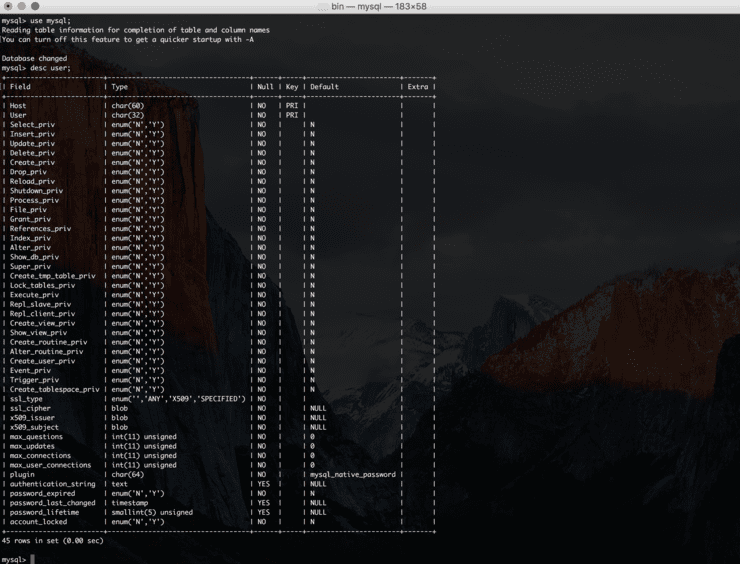
Yes. Ironically, depending on the installation version, the password column may not exist.
I think I spent a lot of time not knowing this fact. You can proceed as follows:
First, return mysql to Start state and then try to connect.
Then select the database with the use mysql command and execute the following command.
UPDATE user set authentication_string=password('new password') where user='root';
Why is that? Usually, if you install the latest version (2016?), Mac’s MySQL is mostly configured as follows.