String Is Immutable
String is immutable in Java. Once created, it cannot be changed.
More precisely, the memory area that stores the string value does not change.
So when you append another string with the + operator, Java does not modify the existing string.
Instead, it creates a new string object and references it. If the reference points to the new string,
the previous string becomes Unreachable and is collected by the garbage collector.
Because of this behavior, string manipulation with String consumes both time and memory.
StringBuilder and StringBuffer
StringBuilder and StringBuffer are frequently discussed with Java strings.
Unlike immutable String, both are mutable. They build one object and resize it as needed during updates.
That is why they are typically faster than String, which creates new objects repeatedly.
Then what is the difference between StringBuilder and StringBuffer?
It is synchronization. StringBuilder is not synchronized, while StringBuffer is synchronized.
You can see that in the append implementation:
// StringBuilder
public StringBuilder append(String str) {
    super.append(str);
    return this;
}

// StringBuffer
public synchronized StringBuffer append(String str) {
    super.append(str);
    return this;
}
How Different Is the Performance?
Let’s compare String, StringBuilder, and StringBuffer by measuring string-update operations.
/**
 * Utility class for measuring elapsed time and printing results
 * @author madplay
 */
class MadClock {
    private long startTime;
    private long endTime;

    public void startClock() {
        startTime = System.nanoTime();
    }

    public void stopClock() {
        endTime = System.nanoTime();
    }

    public void printResult(String clockName) {
        System.out.printf("%s" + ": %.3f seconds %n",
                clockName, (endTime - startTime) / (double) 1_000_000_000);
    }
}
/**
 * Test class for comparing string operations
 * @author madplay
 */
public class StringTest {
    private static final int MAX_LOOP_COUNT = 50_000;

    public static void main(String[] args) {

        // StringBuilder
        StringBuilder builder = new StringBuilder();
        MadClock builderClock = new MadClock();
        builderClock.startClock();
        for (int loop = 1; loop <= MAX_LOOP_COUNT; loop++) {
            builder.append("mad").append(loop).append("play");
        }
        builderClock.stopClock();
        builderClock.printResult("StringBuilder");


        // StringBuffer
        StringBuffer buffer = new StringBuffer();
        MadClock bufferClock = new MadClock();
        bufferClock.startClock();
        for (int loop = 1; loop <= MAX_LOOP_COUNT; loop++) {
            buffer.append("mad").append(loop).append("play");
        }
        bufferClock.stopClock();
        bufferClock.printResult("StringBuffer");


        // String
        String str = "";
        MadClock stringClock = new MadClock();
        stringClock.startClock();
        for (int loop = 1; loop <= MAX_LOOP_COUNT; loop++) {
            str += "mad" + loop + "play";
        }
        stringClock.stopClock();
        stringClock.printResult("String");
    }
}
The test was executed from 10,000 iterations and scaled upward.
As the graph shows, StringBuilder is the fastest and String is the slowest.
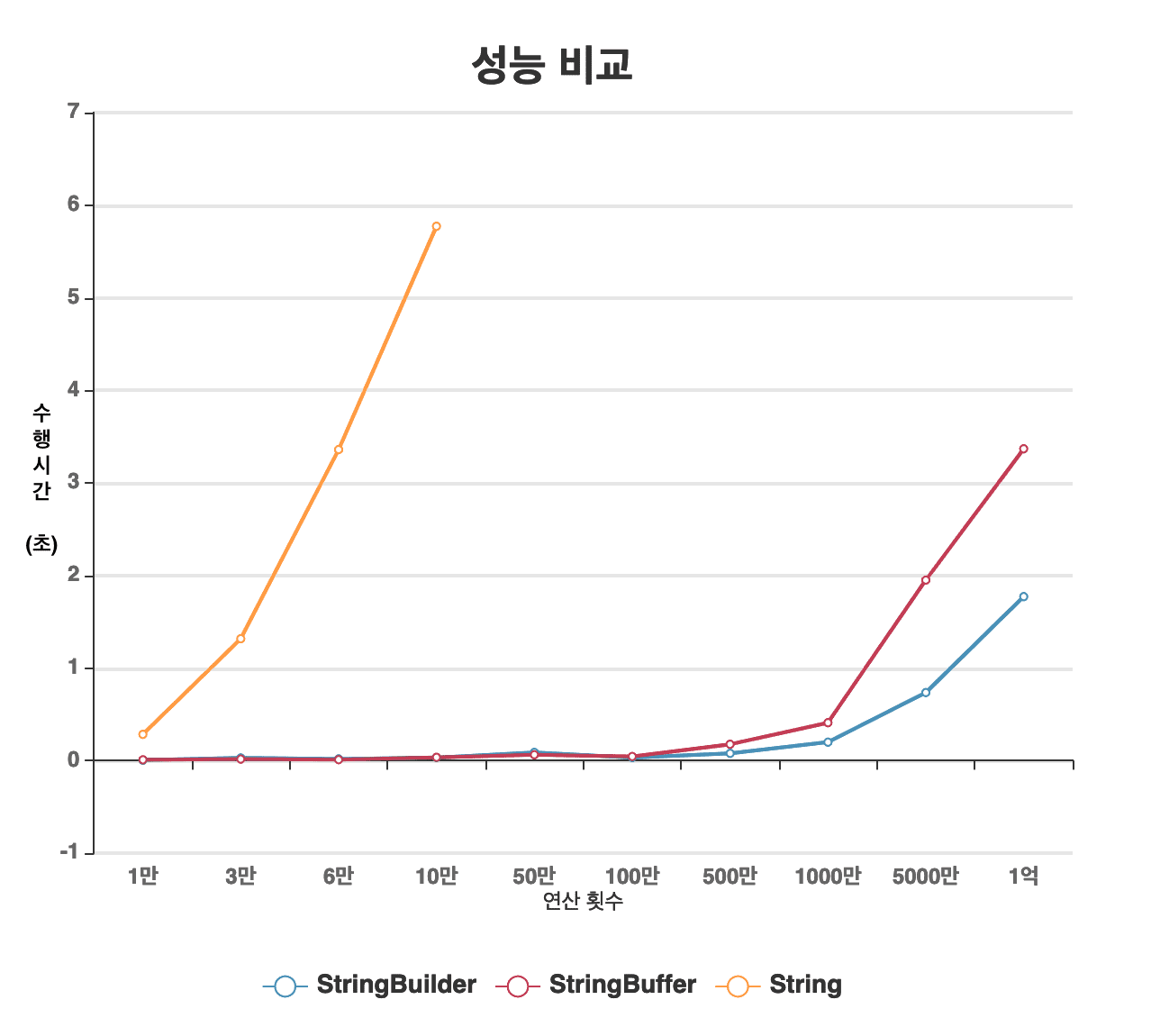
For String, performance dropped sharply after 100,000 operations, so it was excluded in later runs.
Because String creates a new object on each concatenation, it becomes very expensive.
StringBuffer is relatively slower than StringBuilder because synchronization adds overhead.
String Optimization
This is old history now that Java 13 is already out, but since JDK 1.5,
Java rewrites string concatenation to use StringBuilder during compilation.
So performance is better than in older versions.
Let’s verify how this optimization appears in practice:
public class StringTest {
    public static void main(String[] args) {
        String str = "mad";
        String result = str + "h" + "e" + "l" + "l" + "o" + str + "p" + "l" + "a" + "y";
        System.out.println(result);
    }
}
Compile it and inspect the bytecode. Use javap with -c to print disassembled bytecode.
If you want more details such as stack size, add -v.
The sample code was compiled with
1.8.0_171.
$ javac StringTest.java
$ javap -c StringTest

Compiled from "StringTest.java"
public class StringTest {
  public StringTest();
    Code:
       0: aload_0
       1: invokespecial #1  // Method java/lang/Object."<init>":()V
       4: return

  public static void main(java.lang.String[]);
    Code:
       0: ldc           #2  // String mad
       2: astore_1
       3: new           #3  // class java/lang/StringBuilder
       6: dup
       7: invokespecial #4  // Method java/lang/StringBuilder."<init>":()V
      10: aload_1
      11: invokevirtual #5  // Method java/lang/StringBuilder.append:(Ljava/lang/String;)Ljava/lang/StringBuilder;
      14: ldc           #6  // String hello
      16: invokevirtual #5  // Method java/lang/StringBuilder.append:(Ljava/lang/String;)Ljava/lang/StringBuilder;
      19: aload_1
      20: invokevirtual #5  // Method java/lang/StringBuilder.append:(Ljava/lang/String;)Ljava/lang/StringBuilder;
      23: ldc           #7  // String play
      25: invokevirtual #5  // Method java/lang/StringBuilder.append:(Ljava/lang/String;)Ljava/lang/StringBuilder;
      28: invokevirtual #8  // Method java/lang/StringBuilder.toString:()Ljava/lang/String;
      31: astore_2
      32: getstatic     #9  // Field java/lang/System.out:Ljava/io/PrintStream;
      35: aload_2
      36: invokevirtual #10 // Method java/io/PrintStream.println:(Ljava/lang/String;)V
      39: return
}
StringBuilder appears even though it is not explicit in the source.
To see a source-like form, you can also decompile it, though output differs by decompiler.
For correctness, bytecode from javap is more reliable.
In this example,
jadwas used as the decompiler.
String s = "mad";
String s1 = (new StringBuilder()).append(s).append("hello").append(s).append("play").toString();
Although Java improves concatenation by inserting StringBuilder,
if concatenation happens inside a loop, StringBuilder instances are still created repeatedly,
which can still be costly.
Let’s compare that case directly by changing only the loop body in the previous test.
for (int loopCount = 1; loopCount <= 100_000; loopCount++) {
    // Case 1. Assignment only
    str2 = "mad" + loopCount + "play";
}


for (int loopCount = 1; loopCount <= 100_000; loopCount++) {
    // Case 2. Append to existing string
    str += "mad" + loopCount + "play";
}
In case 1, the loop only assigns each computed value. In case 2, it concatenates onto the previous string and assigns it again. Compare both execution time and decompiled form.
// Decompiled case 1 / elapsed time: 0.004 sec
String s = "Hello";
for(int i = 1; i <= 50000; i++)
{
    String s1 = (new StringBuilder()).append("mad").append(i).append("play").toString();
}


// Decompiled case 2 / elapsed time: 35.21 sec
String s2 = "Hello";
for(int j = 1; j <= 50000; j++)
    s2 = (new StringBuilder()).append(s2).append("mad").append(j).append("play").toString();
}
Why is the difference so large?
When you keep concatenating with the previous value, the input string length keeps growing.
As a result, each new StringBuilder() inside the loop allocates enough space for that larger content.
So even a small difference in expression style can create a major runtime difference.
That is why using String for repeated length-changing concatenation in loops is very inefficient.
What About Other Cases?
Are there cases where optimization behaves differently?
First, consider a string constant (final).
final String str = "mad";
String result = "h" + "e" + "l" + "l" + "o" + str + "p" + "l" + "a" + "y";

// Decompiled
String s = "hellomadplay";
Compiled from "StringTest.java"
public class StringTest3 {
  // ... omitted

  public static void main(java.lang.String[]);
    Code:
       0: ldc           #2  // String hellomadplay
       2: astore_2
       3: return
}
With final, the compiler folds the result into one literal and does not build with StringBuilder.
Then what if you concatenate multiple variables instead of one?
String t = "t";
String a = "a";
String e = "e";
String n = "n";
String g = "g";
String result = t + a + e + n + g;

// Decompiled
String s = "t";
String s1 = "a";
String s2 = "e";
String s3 = "n";
String s4 = "g";
String s5 = (new StringBuilder()).append(s).append(s1).append(s2).append(s3).append(s4).toString();
So the compiler does switch to StringBuilder in many cases,
but optimization is not identical across every pattern.
Closing
In practice, StringBuilder is usually the right default for mutable string assembly.
Still, style can depend on team conventions and readability preferences.
In some places, + is clearer.
But once you are doing concatenation in loops,
using String can hurt performance significantly,
so StringBuilder is the safer choice.
Related posts: