What Is Vuex?
Vuex is a state management pattern + library for Vue.js applications. It works as a centralized store for every component in the app and provides a predictable way to mutate state.
Why Do We Need Vuex?
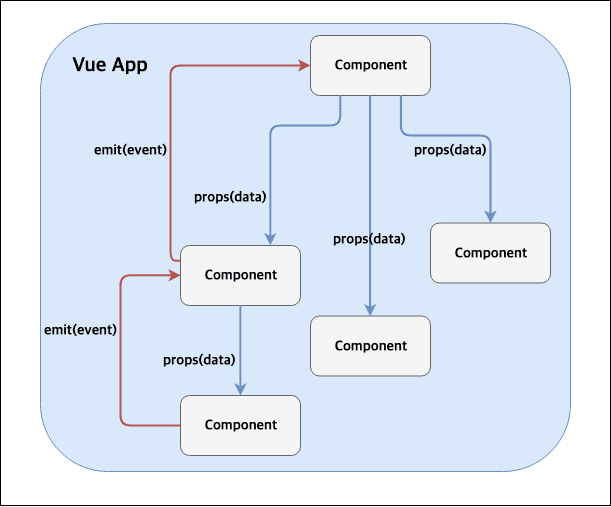
A Vue.js app often builds a screen by splitting it into many components. Of course, if the screen does not need to be split, a single Vue instance is fine (I tried it and it works). Those components pass around state using props. As the number of components grows, managing state via props becomes hard to scale, and even a small typo can break the flow.
Let’s Look at Code
To explain what follows, here is an extreme but simple example. I split the app into just one component, but a real project can have many more. The example updates a parent component’s data when a button click event fires from another component.
// TaengWorld.vue
<template>
  <div>
    <inner-world :msg="message" @tWorld="taengWorld"/>
  </div>
</template>
<script>
import InnerWorld from './components/InnerWorld.vue'

export default {
  name: 'TaengWorld',
  components: {
    InnerWorld
  },
  data() {
    return {
      message: 'HelloWorld!'
    };
  },
  methods: {
    taengWorld(data) {
      this.message = data;
    }
  }
}
</script>
// InnerWorld.vue
<template>
  <div>
    <h1>Welcome to  {{ msg }} </h1>
    <button v-on:click="clickMethod">Click!</button>
  </div>
</template>
<script>
export default {
  name: 'InnerWorld',
  props: {
    msg: String
  },
  methods: {
    clickMethod() {
      // Emit an event named tWorld.
      this.$emit('tWorld', 'TaengWorld!');
    }
  }
}
</script>
To update state, you emit events like the example above and invoke a function in another component. In other words, the child component emits an event and the parent updates the state.
Even in this small example, you can see the issue. As the app grows and the component tree gets deeper, the event flow becomes more complex and harder to follow.
Is There Another Way?
One alternative is EventBus. It lets components exchange data, even across distant parts of the tree. The code looks like this (the EventBus registration code is trivial, so I omitted it).
// TaengWorld.vue
<template>
  <div>
    <inner-world :msg="message"/>
  </div>
</template>
<script>
import InnerWorld from './components/InnerWorld.vue'

export default {
  name: 'TaengWorld',
  components: {
    InnerWorld
  },
  data() {
    return {
      message: 'HelloWorld!'
    };
  },
  mounted() {
    // Listen for events.
    // Use mounted for testing.
    this.EventBus.$on('tWorld', (data) => {
      this.message = data;
    });
  }
}
</script>
// InnerWorld.vue
<template>
  <div>
    <h1>Welcome to  {{ msg }} </h1>
    <button v-on:click="clickMethod">Click!</button>
  </div>
</template>
<script>
export default {
  name: 'InnerWorld',
  props: {
    msg: String
  },
  methods: {
    clickMethod() {
      // Exchange events via the event bus.
      // Not limited to a single depth level.
      this.EventBus.$emit('tWorld', 'TaengWorld!');
    }
  }
}
</script>
The explicit event wiring is gone, but the data still has to flow through props. That means if data is added somewhere in the component hierarchy, every props definition along the path needs to change.
So, Vuex
Here is the Vuex structure. I drew this one for myself, but the official docs version looks better.
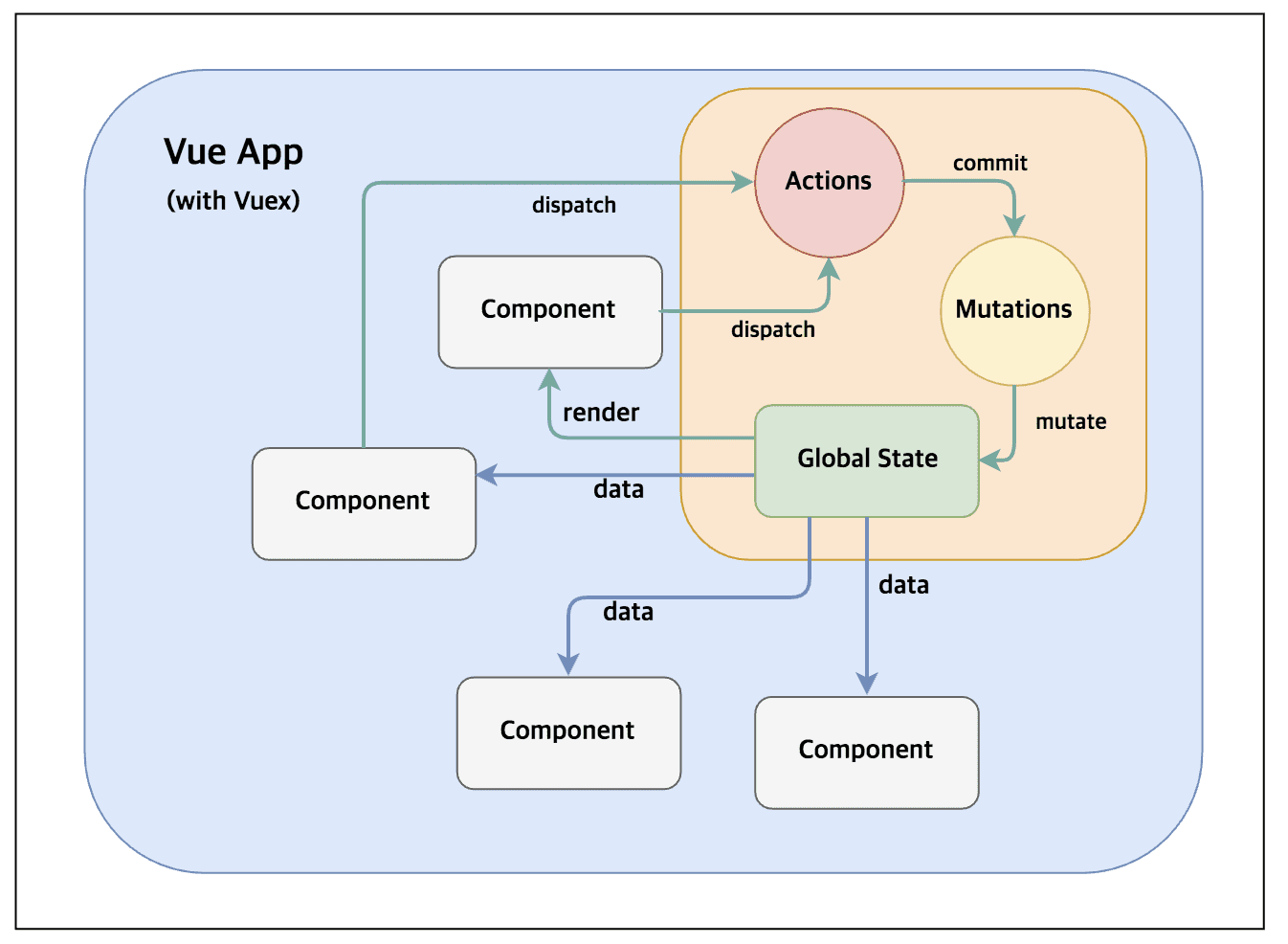
The diagram shows a one-way data flow (Actions -> Mutations -> State -> Components -> Actions…).
Vuex in Code
Below is the same example using Vuex. It includes how to configure the Store. The props and manual event wiring are gone.
// TaengWorld.vue
<template>
  <div>
    <inner-world/>
  </div>
</template>
<script>
import InnerWorld from './components/InnerWorld.vue'

export default {
  name: 'TaengWorld',
  components: {
    InnerWorld
  }
}
</script>
// InnerWorld.vue
<template>
  <div>
    <h1>Welcome to {{ $store.state.message }} </h1>
    <button v-on:click="clickMethod">Click!</button>
  </div>
</template>
<script>
export default {
  name: 'InnerWorld', // No props declaration.
  methods: {
    clickMethod() {
      // No event emit either.
      this.$store.state.message = 'TaengWorld';
    }
  }
}
</script>
// Vuex Store setup code
// ... omitted
import Vuex from 'vuex';
Vue.use(Vuex);

export const store = new Vuex.Store({
  state: {
    message: 'HelloWorld!'
  },
  getters: {
    getMessage: state => state.message
  }
});

new Vue({
  // ... omitted
  store // Register
});
Then how does a root-level component read the data? In this example, how does it read message? Vuex provides helper methods like mapGetters, which keeps it simple.
// TaengWorld.vue
<template>
  <div>
    {{ message }}
    <inner-world/>
  </div>
</template>
<script>
import InnerWorld from './components/InnerWorld.vue'
import {mapGetters} from 'vuex';

export default {
  name: 'TaengWorld',
  components: {
    InnerWorld
  },
  computed: {
    // Assign the value to message in the template.
    ...mapGetters({message: 'getMessage'})
  }
}
</script>
There are also actions and mutations, but I skip them here. By default, Store data disappears on page refresh. The vuex-persistedstate plugin persists the Store in localStorage.
Do We Always Need Vuex?
If the structure is simple, Vuex is not strictly necessary. I also had a learning curve when I first picked up Vue.js, and I struggled when I applied Vuex incorrectly. Use it when it fits the problem.
By the way, I started working with Vue.js recently. It is not easy, but it is fun because it is new.