Spring JDBC
When using JDBC (Java Database Connectivity), developers repeatedly implement and manage boilerplate such as connection handling, exception handling, and transactions. Spring JDBC addresses this by letting the Spring Framework handle these low-level concerns.
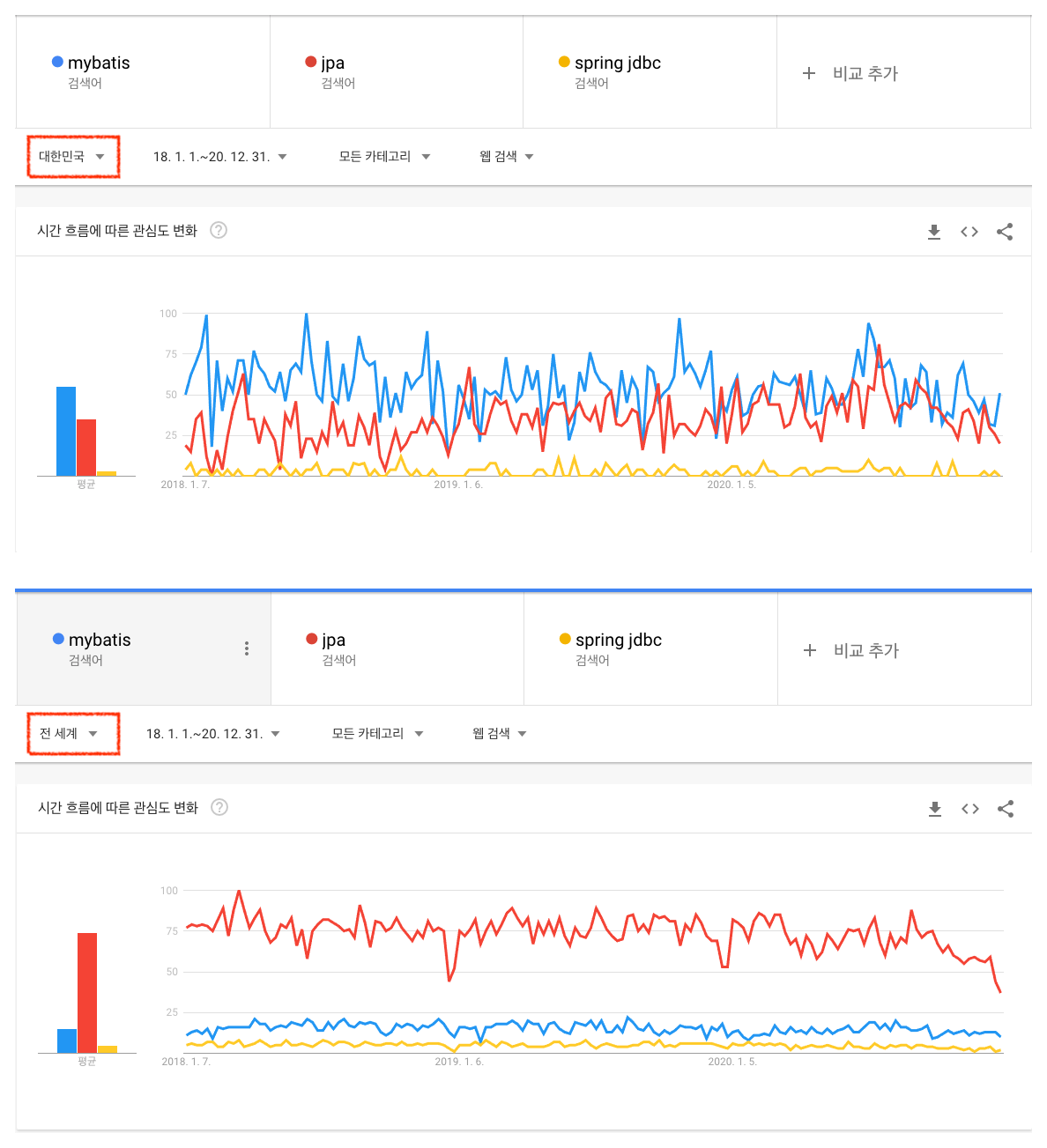
Still, in 2021, projects using Spring JDBC are harder to find. Google Trends also shows this. Not only globally but also in Korea, MyBatis and JPA (Java Persistence API) are far more dominant.
Strong at Bulk Insert
That does not mean Spring JDBC is functionally weak. If you know SQL, you can use Spring JDBC without learning SQL Mapper or ORM frameworks. Configuration is also simple, so learning cost is low.
In practice, bulk insert performance in components such as batch jobs was best with Spring JDBC. For 10,000 records, it was over 2x faster than MyBatis, and the gap grew as data volume increased.
For measurement, MySQL was used and
rewriteBatchedStatementswas set to true. Without this option, bulk insert performance was similar to, or slightly faster than, MyBatis.
Because of this performance advantage, some projects still keep Spring JDBC. If a component only needs straightforward query execution, Spring JDBC can be a better choice than other frameworks.
Lower Readability/Productivity
However, one persistent pain point exists with Spring JDBC: SQL strings mixed directly into Java code. The example below is simple, but readability drops sharply when queries become complex with joins and more conditions.
public List<Article> getArticleList(String id) {
	Map<String, Object> params = new HashMap<>();
	params.put("id", id);

	// Mapper definition omitted
    return jdbcTemplate.queryForList(
    	"SELECT " +
        "    id, title, content, author " +
        "FROM " +
        "    article " +
        "WHERE " +
        "    id = :id", params, new ArticleMapper());
}
Also, when testing SQL in tools like Workbench or Sequel Pro, you repeatedly remove surrounding double quotes. Instead of improving productivity, you can end up spending time fighting string formatting.
JEP 368: Text Blocks
There is a way. Java 13 introduced Text Blocks as the second preview spec.
With text blocks, you no longer need to concatenate long strings with +.
public List<Article> getArticleList(String id) {
    Map<String, Object> params = new HashMap<>();
    params.put("id", id);

	// Mapper definition omitted
	return jdbcTemplate.queryForList(
        """
            SELECT
                id, title, content, author
            FROM
                article
            WHERE
                id = :id
        """, params, new ArticleMapper());
}
But some projects cannot use JDK 13+ due to project constraints or company policy. Most teams use LTS (Long Term Support) versions. At that time, the latest LTS was Java 11, which does not include text blocks. What should you do then?
Option 1: Spring Properties
One approach is to use Spring Properties.
Move SQL to an XML file, then load it via configuration at code level.
Define SQL in XML first:
<?xml version="1.0" encoding="UTF-8"?>
<!DOCTYPE properties SYSTEM "http://java.sun.com/dtd/properties.dtd" >
<properties>
  <entry key="article.selectArticleList">
      SELECT
        id, title, content, author
      FROM
        article
      WHERE
        id = :id
  </entry>
</properties>
Then use it in Java:
@Repository
@PropertSource("classpath:sqlmap/article.xml")
public class ArticleRepository {
	private NamedParameterJdbcTemplate namedJdbcTemplate;

	@Value("${article.selectArticleList}")
    private String selectArticleListQuery;

	public List<Article> getArticleList(String id) {
		Map<String, Object> params = new HashMap<>();
		params.put("id", id);

		return namedJdbcTemplate.queryForList(
			selectArticleListQuery, params, new ArticleMapper());
	}
}
This separates SQL from business logic, but as query count grows, member fields also grow and hurt readability.
Option 2: Kotlin Package-Level Functions
Kotlin, a JVM language, supports multiline strings by default. With a few Gradle settings, you can use Kotlin for SQL definitions.
apply plugin: 'kotlin'

buildscript {
    ext {
        kotlinVersion = '1.5.0'
    }
    repositories {
        jcenter()
    }
    dependencies {
        classpath("org.jetbrains.kotlin:kotlin-gradle-plugin:${kotlinVersion}")
    }
}

dependencies {
    implementation "org.jetbrains.kotlin:kotlin-stdlib:${kotlinVersion}"
}
Write SQL in a Kotlin file (.kt):
// article.kt
fun selectArticleListQuery() = """
    SELECT
        id, title, content, author
    FROM
        article
    WHERE
        id = :id
"""
Use it in Java like this. Access it like a global function.
If the Kotlin file is Article, it is exposed as ArticleKt.
@Repository
public class ArticleRepository {
	private NamedParameterJdbcTemplate namedJdbcTemplate;

	public List<Article> getArticleList(String id) {
		Map<String, Object> params = new HashMap<>();
		params.put("id", id);

		return namedJdbcTemplate.queryForList(
			ArticleKt.selectArticleListQuery(), params, new ArticleMapper());
	}
}
This looks better than separating SQL in XML, but there is one more option.
Option 3: Groovy
A final option is applying Groovy. It also needs Gradle configuration, but less than Kotlin.
apply plugin: 'groovy'

sourceSets {
    main {
        java { srcDirs = [] }
        groovy { srcDirs += ['src/main/java'] }
    }
}

dependencies {
    implementation 'org.codehaus.groovy:groovy-all:3.0.8'
}
Write SQL in a Groovy file (.groovy):
class ArticleSql {
	public static final String SELECT_ARTICLE_LIST = """
        SELECT
            id, title, content, author
        FROM
            article
        WHERE
            id = :id
    """
}
Java usage looks like this. It is similar to Kotlin, but unlike Kotlin, you access the SQL variable through the declared class name.
@Repository
public class ArticleRepository {
	private NamedParameterJdbcTemplate namedJdbcTemplate;

	public List<Article> getArticleList(String id) {
		Map<String, Object> params = new HashMap<>();
		params.put("id", id);

		return namedJdbcTemplate.queryForList(
			ArticleSql.SELECT_ARTICLE_LIST, params, new ArticleMapper());
	}
}
Closing
All three approaches above separate SQL from business logic. Personally, the Groovy approach is the best.
Gradle setup is simpler than Kotlin, and Groovy inherits Java syntax so adoption feels easier. Still, using Java 13+ and multiline strings without extra setup is the best overall path. Once a newer LTS is used broadly, this extra setup becomes unnecessary.