Kafka Connect Series
- Kafka Connect: Introduction and Architecture
- Kafka Connect: Building a Debezium CDC Pipeline
- Kafka Connect: Monitoring and Incident Response
Moving Data Without Writing Code
Running Kafka in production inevitably leads to building pipelines that read records from a database, publish them to a topic, and then load messages from that topic into a search engine. The first instinct is to write dedicated producer and consumer applications, but as the number of pipelines grows, recurring problems surface.
Offset management, failure recovery, schema conversion, and parallel processing logic are nearly identical across pipelines,
yet each one requires a fresh implementation. Code quality varies from developer to developer, and operational overhead scales linearly with the pipeline count.
Even tuning a single producer properly demands careful decisions about retries, acks,
idempotency, and batch configuration. Repeating that process across dozens of pipelines is simply inefficient.
What Is Kafka Connect?
Kafka Connect is a configuration-driven data pipeline framework included in the Kafka ecosystem. Instead of writing producers and consumers by hand, you define “where to read and where to write” in a single JSON configuration, and the framework handles cross-cutting concerns like offset tracking, failure recovery, and scale-out automatically.
Kafka’s producer and consumer are client libraries that let you code how data moves. Developers implement offset management, error handling, and serialization themselves. Kafka Connect, on the other hand, is a separate runtime where you declare what moves where via configuration. It handles data transfer between Kafka brokers and external systems (databases, search engines, cloud storage, etc.), letting developers focus on the data flow itself rather than pipeline plumbing.
Kafka Connect Architecture
Connector, Task, and Worker
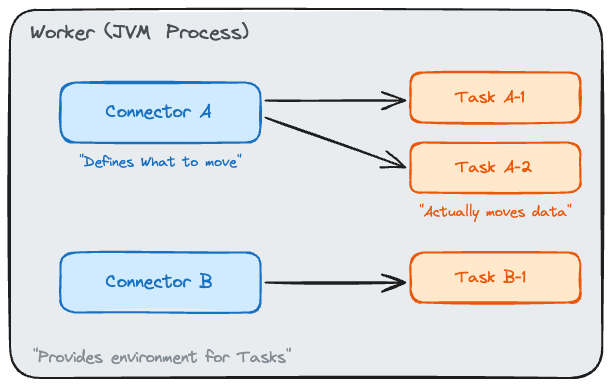
Kafka Connect consists of three core components.
Connector is the logical unit of a pipeline. A statement like “load the MySQL articles table into the article-events topic” is defined as a single Connector.
The Connector itself does not copy data. Its role is to declare the configuration: which source, which sink, and what transformations to apply.
Task is the execution unit that performs the actual data copying. A single Connector can spawn multiple Tasks for parallel processing.
For example, if three MySQL tables need to be read simultaneously, setting tasks.max=3 assigns each table to a separate Task.
Worker is the JVM process that hosts Tasks. Multiple Connectors’ Tasks run together inside a single Worker. When multiple Workers are available, Tasks are distributed across them.
In short, a Connector defines “what to move,” a Task “actually moves it,” and a Worker “provides the execution environment for Tasks.”
Source Connector and Sink Connector
Connectors come in two types based on the direction of data flow.
Source Connector reads data from an external system and writes it to a Kafka topic.
A typical example is a pipeline that periodically reads the MySQL articles table and sends records to the article-events topic.
Sink Connector works in the opposite direction. It reads messages from a Kafka topic and loads them into an external system.
Indexing messages from the article-events topic into Elasticsearch enables an article search feature without writing any consumer logic.
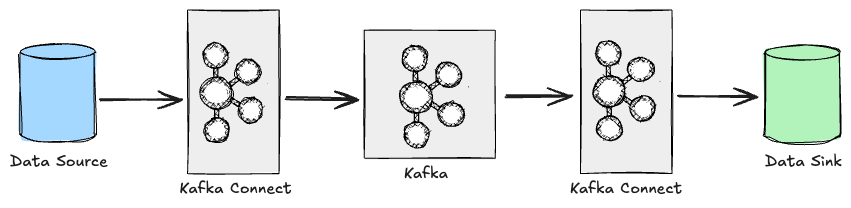
Source and Sink Connectors can coexist within a single Kafka Connect cluster, making it possible to build an entire “MySQL → Kafka → Elasticsearch” pipeline using Kafka Connect alone.
Converter and SMT
When a Connector writes to or reads from a topic, the Converter handles serialization and deserialization.
With JsonConverter, messages are stored as JSON. With AvroConverter, messages are stored in Avro format through integration with Schema Registry.
For simple pipelines that do not require schema management, JsonConverter is sufficient.
When multiple teams consume the same topic and need to guarantee schema compatibility, AvroConverter is the better choice.
SMT (Single Message Transform) is a lightweight transformation applied as a message passes through a Connector. Operations like dropping a specific field, converting a timestamp format, or changing topic routing can be handled entirely through Connector configuration.
{
  // List SMT names separated by commas. They execute in order.
  "transforms": "dropField,routeByStatus",
  // dropField: removes the internal_id field from the message
  "transforms.dropField.type": "org.apache.kafka.connect.transforms.ReplaceField$Value",
  "transforms.dropField.exclude": "internal_id",
  // routeByStatus: replaces the topic name using a regex
  "transforms.routeByStatus.type": "org.apache.kafka.connect.transforms.RegexRouter",
  "transforms.routeByStatus.regex": "article-events",
  "transforms.routeByStatus.replacement": "article-events-v2"
}
However, since SMTs operate on a per-message basis, they are not suited for complex transformations that join or aggregate multiple messages. For those scenarios, Kafka Streams or a dedicated stream processing framework is a better fit.
Standalone Mode vs. Distributed Mode
Kafka Connect Workers can run in two modes. The choice between them significantly affects scalability, fault tolerance, and operational workflow.
When to Use Standalone Mode
Standalone mode runs all Connectors and Tasks in a single Worker process. Configuration is passed via property files, and offset information is stored in a local file. Its simplicity makes it useful for quickly validating pipelines in local development or test environments.
# connect-standalone.sh: Standalone mode startup script
# First argument: Worker common settings (bootstrap.servers, key/value converter, etc.)
# Remaining arguments: Connector config files to run (multiple allowed)
connect-standalone.sh worker.properties connector-a.properties connector-b.properties
Because it runs as a single process, the entire pipeline stops if the Worker goes down, and horizontal scaling is not possible. Unless the use case is something inherently single-node, like a log collection agent, Standalone mode is hard to recommend for production.
Why Distributed Mode Is Recommended for Production
In Distributed mode, multiple Workers form a single Connect cluster and distribute Tasks across themselves. If one Worker fails, its Tasks are automatically reassigned (rebalanced) to the remaining Workers.
The biggest difference from Standalone mode is how state is stored.
Offsets, Connector configurations, and Task status are persisted not in local files but in Kafka internal topics (connect-offsets, connect-configs, connect-status).
As covered in the post on Kafka topic configurations, these internal topics also require proper partition counts and replication factors
to ensure the stability of Distributed mode.
Connector management is also different. Instead of property files, Connectors are registered, updated, and deleted through the REST API.
# Register a Connector: send the Connector name and config via a POST request
curl -X POST http://localhost:8083/connectors \
  -H "Content-Type: application/json" \
  -d '{
    "name": "article-source",
    "config": {
      "connector.class": "io.confluent.connect.jdbc.JdbcSourceConnector",
      "connection.url": "jdbc:mysql://mysql-host:3306/news",
      "connection.user": "connect_user",
      "connection.password": "****",
      "table.include.list": "articles",       // Table to read from
      "mode": "incrementing",               // Track changes based on an incrementing column
      "incrementing.column.name": "id",     // The incrementing column
      "topic.prefix": "article-events-",        // Prefix for generated topics
      "poll.interval.ms": "5000"              // Polling interval (default: 5 seconds)
    }
  }'
The status of a registered Connector can be checked through a separate endpoint.
# Check Connector status
curl http://localhost:8083/connectors/article-source/status
{
  "name": "article-source",
  "connector": {
    "state": "RUNNING",
    "worker_id": "localhost:8083"
  },
  "tasks": [
    {
      "id": 0,
      "state": "RUNNING",
      "worker_id": "localhost:8083"
    }
  ]
}
If the REST API is accessible without authentication, anyone can register or delete Connectors. In production environments, network access controls or a dedicated authentication plugin should be in place.
The table below summarizes the key differences between the two modes.
| Aspect | Standalone | Distributed |
|---|---|---|
| Scalability | Single Worker, no horizontal scaling | Horizontal scaling across multiple Workers |
| Fault tolerance | Pipeline stops when the Worker dies | Automatic Task reassignment (rebalance) |
| Offset storage | Local file | Kafka internal topics |
| Configuration | Property files | REST API |
| Use case | Local testing, simple agents | Production operations |
Wrapping Up
The core value of Kafka Connect lies in managing repetitive data pipelines through configuration rather than code. Thanks to the clear separation of Connector, Task, and Worker roles, combined with Distributed mode’s automatic rebalancing, operational complexity does not scale proportionally even as the number of pipelines grows.
That said, Kafka Connect is not the right answer for every situation. When a pipeline requires complex business logic during message transformation, or when interaction with external systems goes beyond simple loading, building a custom producer/consumer offers more flexibility. Knowing when Kafka Connect is not a good fit helps you get the most out of it when it is.
Finally, this post used the JDBC Source Connector as an example, but the polling approach has limitations such as the inability to detect DELETEs. The next post covers building a Debezium CDC pipeline that reads database transaction logs directly to overcome these constraints.