What is Reflection?
Reflection provided in Java is a feature not found in other languages including C, C++. It enables dynamic loading of another class from an already loaded class to use constructors, member fields (Member Variables), and member methods (Member Method), etc.
That is, it can be expressed as a programming technique that can analyze and extract information of specific classes through objectification dynamically at run time, not compile time.
How to Use It?
Reflection can simply create instances from class names like code such as Class.forName("class name").newInstance
and can use this to get class information.
import java.lang.reflect.Method;

/**
 * Reflection Example - Vector Class
 *
 * @author Kimtaeng
 * Created on 2018. 1. 5
 */
public class MadPlay {

    public void reflectionTest() {
        try {
            Class vectorClass = Class.forName("java.util.Vector");

            Method[] methods = vectorClass.getDeclaredMethods();

            for (Method method : methods) {
                System.out.println(method.toString());
            }

        } catch (ClassNotFoundException e) {
            // Exception Handling
        }
    }

    public static void main(String[] args) {
        new MadPlay().reflectionTest();
    }
}
Line 13 gets a Class object by giving Java’s Vector class path as an argument to the Class.forName() method.
On the other hand, looking inside the method, since ClassNotFoundException that occurs when a class cannot be found is declared,
it handles exceptions like the try-catch statement above.
@CallerSensitive
public static Class<?> forName(String className)
            throws ClassNotFoundException {
    Class<?> caller = Reflection.getCallerClass();
    return forName0(className, true, ClassLoader.getClassLoader(caller), caller);
}
What will be the execution result of code that gets the Vector class object above and outputs names of all declared methods? As expected, a list of methods declared in the class is output. (I omitted the middle part because there are many)
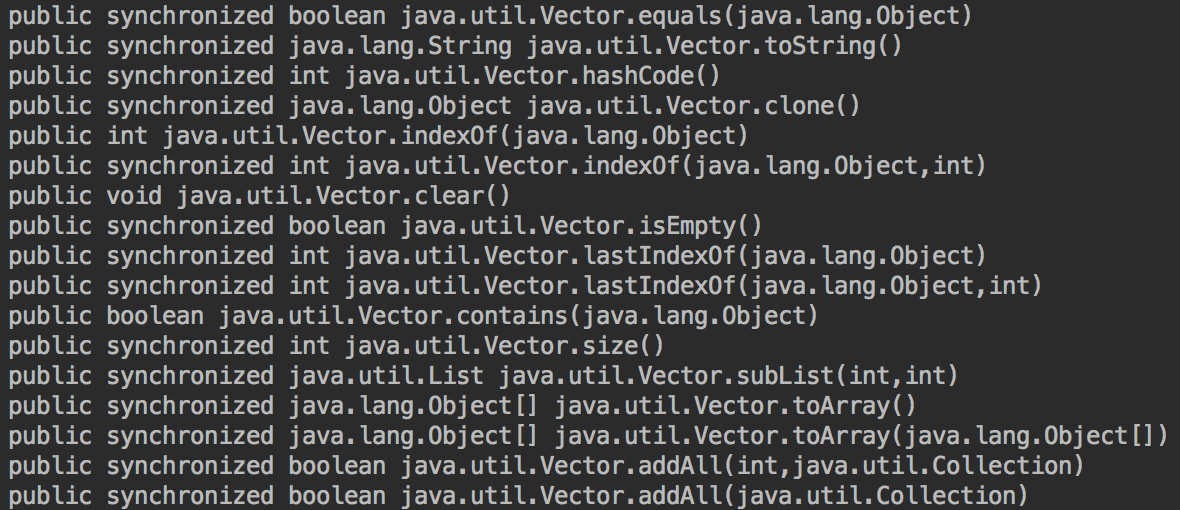
Not only that, but you can also check method parameters and return types.
import java.lang.reflect.Method;

/**
 * Reflection Example - Parameter Types
 *
 * @author Kimtaeng
 * Created on 2018. 1. 5
 */
public class MadPlay {

    public void reflectionTest() {

        try {
            Class vectorClass = Class.forName("java.util.Vector");

            Method[] methods = vectorClass.getDeclaredMethods();

            /* Specify arbitrary method, check by name */
            Method method = methods[25];
            System.out.println("Class Name : " + method.getDeclaringClass());
            System.out.println("Method Name : " + method.getName());
            System.out.println("Return Type : " + method.getReturnType());

            /* Parameter Types */
            Class[] paramTypes = method.getParameterTypes();
            for(Class paramType : paramTypes) {
                System.out.println("Param Type : " + paramType);
            }

            /* Exception Types */
            Class[] exceptionTypes = method.getExceptionTypes();
            for(Class exceptionType : exceptionTypes) {
                System.out.println("Exception Type : " + exceptionType);
            }

        } catch (ClassNotFoundException e) {
            // Exception Handling
        }
    }

    public static void main(String[] args) {
        new MadPlay().reflectionTest();
    }
}
Can We Call Methods by Name?
To conclude, yes. Examining it with the example below:
import java.lang.reflect.Method;

/**
 * Reflection Example - Call method by name
 *
 * @author Kimtaeng
 * Created on 2018. 1. 5
 */
class MadLife {
    public void sayHello(String name) {
        System.out.println("Hello, " + name);
    }
}

public class MadPlay {

    public void reflectionTest() {

        try {
            Class myClass = Class.forName("MadLife");
            Method method = myClass.getMethod("sayHello", new Class[]{String.class});
            method.invoke(myClass.newInstance(), new Object[]{new String("Kimtaeng")});

        } catch (Exception e) {
            // Exception Handling
        }
    }

    public static void main(String[] args) {
        new MadPlay().reflectionTest();
    }
}
Line 20 above passed the name of the class to find as a parameter to the Class.forName() method,
and line 21 immediately below finds the method by entering the name and parameter types.
And finally, line 22 specifies the object to execute the method using the newInstance() method and then passes the string parameter to output.
You can also modify values of member fields in other classes.
import java.lang.reflect.Field;

/**
 * Reflection Example - Modify member variable in class
 *
 * @author Kimtaeng
 * Created on 2018. 1. 5
 */
class MadLife {
    public int number;

    public void setNumber(int number) {
        this.number = number;
    }
}

public class MadPlay {

    public void reflectionTest() {

        try {
            Class myClass = Class.forName("MadLife");

            Field field = myClass.getField("number");
            MadLife obj = (MadLife) myClass.newInstance();
            obj.setNumber(5);

            System.out.println("Before Number : " + field.get(obj));
            field.set(obj, 10);
            System.out.println("After Number : " + field.get(obj));
        } catch (Exception e) {
            // Exception Handling
        }
    }

    public static void main(String[] args) {
        new MadPlay().reflectionTest();
    }
}
You can arbitrarily change member field values of that object with get(), set() methods for the member field (line 24 above) received by passing the name as a parameter.
Why Use Reflection?
Why use reflection? As mentioned earlier, when dynamically loading other classes at run time, when you need to get information about classes, member fields, and methods, etc. Of course, you can implement high-quality code even without reflection, but using it allows you to create more flexible code.
Quoting Java-related books or reference materials, it’s said that Java’s reflection can also obtain package information, access modifiers, super classes, annotations, etc. of classes.
Are There Any Points to Note?
Although it’s a powerful feature not found in other languages, there are also points to note. Since private members not exposed externally can also be accessed and manipulated,
you need to be careful. Private members can be accessed by setting Field.setAccessible() method to true.