Java provides several ways to generate random values: the built-in Math.random static method,
utility methods from Apache Commons, and the security-focused SecureRandom class.
Math.random Method
This method uses random from java.lang.Math.
Math.random is static, so you can call it without creating an object.
It returns a double greater than or equal to 0.0 and less than 1.0.
Because it uses the current time as a seed, each run returns different values.
// greater than or equal to 0.0 (inclusive), less than 1.0 (exclusive)
double randomValue = Math.random();
You can generate an integer in a range [min, max) as follows.
// random number greater than or equal to min and less than max
int random = (int)((Math.random() * (max - min)) + min);
Random Class
You can also use java.util.Random.
Unlike Math.random, you create an instance.
There are two constructors: a no-arg constructor and a constructor that takes a long seed.
// create with default constructor
Random random = new Random();

// create with explicit seed
Random randomWithSeed = new Random(5);
Use the following for range-constrained values.
int randomValueWithRange = random.nextInt(max - min) + min;
From Java 8, ints makes it easy to create an IntStream of random values.
// infinite random stream
IntStream intStream = random.ints();

// stream with 5 random values
IntStream intStreamWithSize = random.ints(5);

// you can set size, min, and max
// stream with 5 values in [1, 5)
IntStream intStreamWithSizeAndRange = random.ints(5, 1, 5);
Do Random Values Show a Pattern?
When you use Random with a fixed seed, be careful. See the code below.
for (int i = 0; i < 5; i++) {
    Random random = new Random(5);
    for (int j = 0; j < 5; j++) {
        System.out.print(random.nextInt() + " ");
    }
    System.out.println();
}
The output reveals a pattern. As shown below, instances with the same seed produce the same sequence.
-1157408321 758500184 379066948 -1667228448 2099829013
-1157408321 758500184 379066948 -1667228448 2099829013
-1157408321 758500184 379066948 -1667228448 2099829013
-1157408321 758500184 379066948 -1667228448 2099829013
-1157408321 758500184 379066948 -1667228448 2099829013
Why? Computers do not make unconscious, accidental choices like humans. They return results for defined inputs. So this is not truly random. It only imitates randomness with an algorithm, which is called pseudo-random generation.
For reference, when seed is not specified, Random uses current system time.
public Random() {
    this(seedUniquifier() ^ System.nanoTime());
}

private static long seedUniquifier() {
    // L'Ecuyer, "Tables of Linear Congruential Generators of
    // Different Sizes and Good Lattice Structure", 1999
    for (;;) {
        long current = seedUniquifier.get();
        long next = current * 1181783497276652981L;
        if (seedUniquifier.compareAndSet(current, next))
            return next;
    }
}
Apache Commons Math
Another option is RandomDataGenerator from Apache Commons Math.
RandomDataGenerator randomDataGenerator = new RandomDataGenerator();
int randomIntWithRange = randomDataGenerator.nextInt(min, max);
Add the dependency below. As of July 2022, the latest version is 3.6.1 released in March 2016.
<dependency>
    <groupId>org.apache.commons</groupId>
    <artifactId>commons-math3</artifactId>
    <version>3.6.1</version>
</dependency>
Apache Commons Lang3
You can also use RandomUtils from Apache Commons Lang3.
It is a utility library that supplements Random, and you call it via static methods as below.
int randomInt = RandomUtils.nextInt();
int randomIntWithRange = RandomUtils.nextInt(min, max)
This also requires dependencies. As of July 2022, the latest version is 3.12.0 released in March 2021.
<dependency>
    <groupId>org.apache.commons</groupId>
    <artifactId>commons-lang3</artifactId>
    <version>3.12.0</version>
</dependency>
ThreadLocalRandom Class
Java 7 added java.util.concurrent.ThreadLocalRandom.
int randomValue = ThreadLocalRandom.current().nextInt();

// generate a random value less than 5 (exclusive)
int randomValueWithMax = ThreadLocalRandom.current().nextInt(5);

// generate a random value in [1, 5)
int randomValueWithRange = ThreadLocalRandom.current().nextInt(1, 5);
From Java 8, ThreadLocalRandom also supports ints, like Random.
IntStream intStream = ThreadLocalRandom.current().ints();
IntStream intStreamWithSize = ThreadLocalRandom.current().ints(5);
IntStream intStreamWithSizeAndRange = ThreadLocalRandom.current().ints(5, 1, 5);
Random vs ThreadLocalRandom
Compared with Random, ThreadLocalRandom has these advantages.
No Need to Create a New Instance Each Time
Unlike Random, which you instantiate via constructor,
ThreadLocalRandom is accessed through current and then used directly.
int randomValue = ThreadLocalRandom.current().nextInt();
No Need to Manage a Seed
Unlike Random, ThreadLocalRandom blocks seed-related misuse by design.
setSeed is implemented to throw an exception:
public void setSeed(long seed) {
    // only allow call from super() constructor
    if (initialized)
        throw new UnsupportedOperationException();
}
Better Performance in Multi-Threaded Environments
Random is thread-safe, but one instance works globally when shared.
If many threads use the same instance, contention degrades performance.
private final AtomicLong seed;

protected int next(int bits) {
    long oldseed, nextseed;
    AtomicLong seed = this.seed;
    do {
        oldseed = seed.get();
        nextseed = (oldseed * multiplier + addend) & mask;
    } while (!seed.compareAndSet(oldseed, nextseed));

    return (int)(nextseed >>> (48 - bits));
}
In contrast, ThreadLocalRandom instances are isolated per current thread.
This reduces instance overhead and contention, so it usually performs better under multi-threading.
public static ThreadLocalRandom current() {
    if (U.getInt(Thread.currentThread(), PROBE) == 0)
        localInit();
    return instance;
}
Caution: Do You Always Need to Call current?
Yes. You should access ThreadLocalRandom through current each time.
Creating an instance directly or storing current results in a member field can break per-thread isolation,
so you lose expected performance and behavior.
SecureRandom
If you need stronger security where generated random values must be hard to predict,
consider SecureRandom.
It generates random values for primitive types as shown below.
SecureRandom secureRandom = new SecureRandom();

final int randomInt = secureRandom.nextInt();
final long randomLong = secureRandom.nextLong();
final float randomFloat = secureRandom.nextFloat();
final double randomDouble = secureRandom.nextDouble();
final boolean randomBoolean = secureRandom.nextBoolean();
You can also generate range-based values [min, max).
int randomInt = secureRandom.nextInt(max - min) + min
Because it extends Random, it also supports random streams from Java 8.
IntStream randomInts = secureRandom.ints();
LongStream randomLongs = secureRandom.longs();
DoubleStream randomDoubles = secureRandom.doubles();
Random vs SecureRandom
SecureRandom is cryptographically stronger than Random.
Random uses system time as seed or generates a related seed. If an attacker knows seed timing, reproduction is easier.
SecureRandom uses OS random data as seed (see entropy section below).
Also, unlike Random with 48-bit state, SecureRandom can include up to 128 bits,
so repetition probability is lower and breaking it requires more attempts.
getInstanceStrong
Java 8 added static method getInstanceStrong.
It returns an instance using a strong algorithm available in the system.
SecureRandom secureRandom = SecureRandom.getInstanceStrong();
Available algorithms are listed in java.security:
${JAVA_HOME}/jre/lib/security/java.security on Java 8,
and ${JAVA_HOME}/conf/security/java.security on OpenJDK 17.
securerandom.strongAlgorithms=NativePRNGBlocking:SUN
On macOS Monterey + Temurin OpenJDK, a SecureRandom created via constructor uses NativePRNG by default,
which reads /dev/urandom.
An instance from getInstanceStrong uses NativePRNGBlocking, which reads the relatively stronger /dev/random.
Caution: Is SecureRandom Too Slow?
In Unix-like environments such as Linux, SecureRandom can be slow in some cases.
The core cause is /dev/random. Let’s look closer.
Unix-like systems typically use /dev/random and /dev/urandom to generate pseudo-random values.
As shown below, both read from an entropy pool fed by entropy sources.
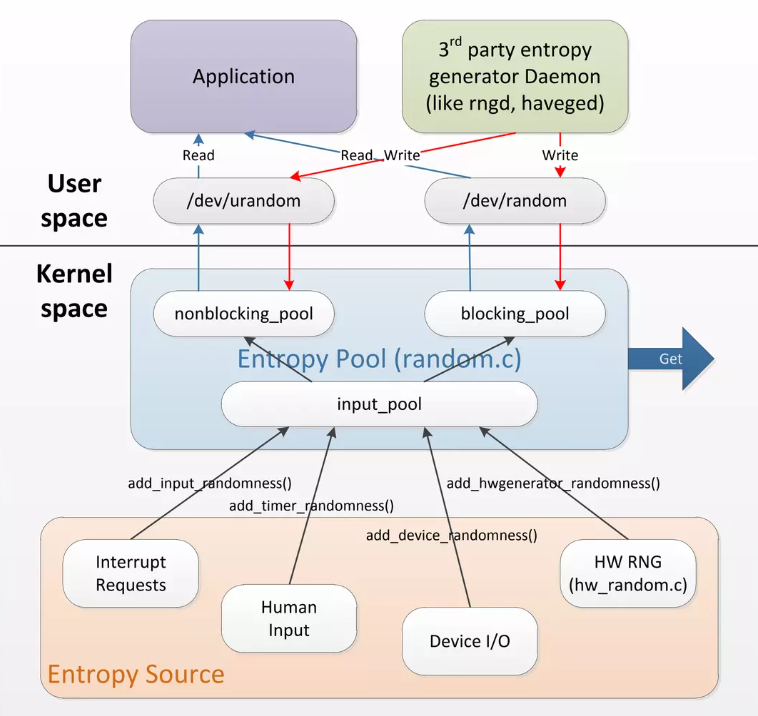
Image source: https://pt.slideshare.net/nij05/slideshare-linux-random-number-generator
The difference is the entropy pool behavior.
/dev/urandom uses a non-blocking pool, while /dev/random uses a blocking pool.
/dev/urandom still returns values even when entropy is low.
/dev/random waits (blocks) until enough entropy is available.
That wait causes performance degradation.
You can also see this in the SecureRandom API comment:
Note: Depending on the implementation, the generateSeed and nextBytes methods may block as entropy is being gathered, for example, if they need to read from /dev/random on various Unix-like operating systems.
For example, with getInstanceStrong, you can observe this slowdown in Linux.
SecureRandom secureRandom = SecureRandom.getInstanceStrong();
int randomInt = secureRandom.nextInt();

// for reference, `nextInt` calls `next`
@Override
public int nextInt() {
    return next(32);
}

// and `next` calls `nextBytes`
@Override
protected final int next(int numBits) {
	int numBytes = (numBits+7)/8;
	byte[] b = new byte[numBytes];
	int next = 0;

	nextBytes(b);
	for (int i = 0; i < numBytes; i++) {
	    next = (next << 8) + (b[i] & 0xFF);
	}

	return next >>> (numBytes*8 - numBits);
}
Oracle’s suggested workaround is to change the setting below in java.security.
In Java 17, this file is under ${JAVA_HOME}/conf/security.
# before
securerandom.source=file:/dev/random

# after
securerandom.source=file:/dev/urandom
From a security perspective, /dev/random is stronger than /dev/urandom,
but it can hurt application performance, so Oracle guidance recommends choosing based on context.
This issue is easy to miss when local and server environments differ, and often appears only after deployment.