What Are Cron Expressions?
Expressions used as scheduling parameters when running Cron are called Cron Expressions. They’re used in Unix/Linux-based schedulers but are also used in Quartz schedulers. Cron expressions can control scheduling by combining fields and special characters.
Cron Expressions: Structure
Cron expressions are structured in the following form. Linux/Unix cron expressions use 5 fields, and Quartz cron expressions use 7 fields.
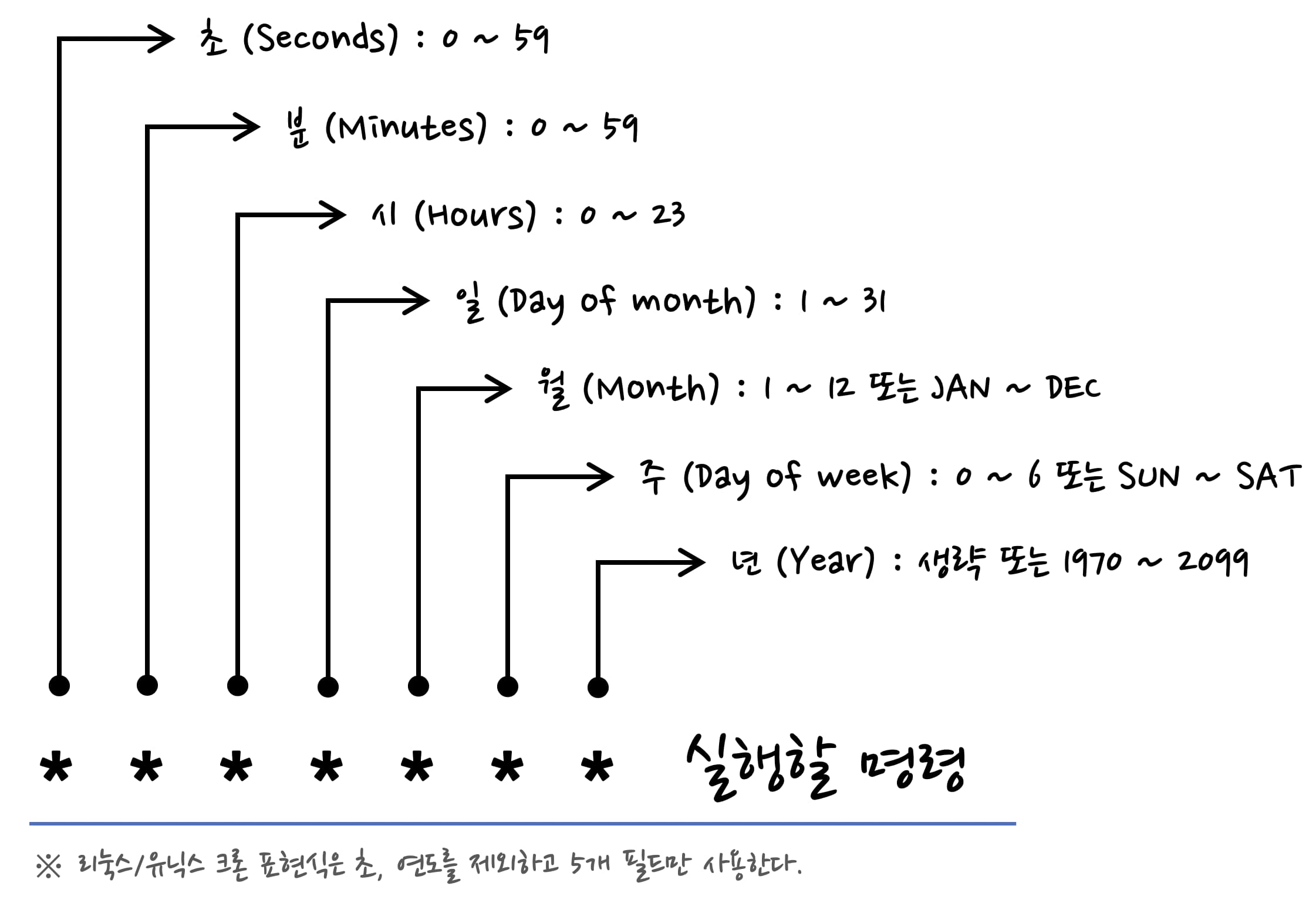
Cron Expressions: Fields
Seconds
- Value range: 0 ~ 59
- Allowed special characters:
* , - / - Not used in Linux/Unix crontab.
Minutes
- Value range: 0 ~ 59
- Allowed special characters:
* , - /
Hours
- Value range: 0 ~ 23
- Allowed special characters:
* , - /
Day of month
- Value range: 1 ~ 31
- Allowed special characters:
* , - ? L W
Month
- Value range: 1 ~ 12 or JAN ~ DEC
- Allowed special characters:
* , - /
Day of week
- Value range: 0 ~ 6 or SUN ~ SAT
- Allowed special characters:
* , - ? L #
Year
- Value range: omitted or 1970 ~ 2099
- Allowed special characters:
* , - / - Not used in Linux/Unix crontab.
Cron Expressions: Special Characters
*: All values (used like every hour, every day, every week)?: Any value is fine, not a specific value-: When specifying ranges,: When specifying multiple values/: Increment values, that is, when setting initial values and incrementsL: Indicates the last value in a specifiable rangeW: When setting the nearest weekday#: When setting the Nth specific day of the week
Cron Expression Examples
Every 10 minutes
0 0/10 * * * *
Every 3 hours
0 0 0/3 * * *
Every day at 14:30 in 2018
0 30 14 * * * 2018
Every 10 minutes between 10:00 and 19:00 every day
0 0/10 10-19 * * *
Every 10 minutes only at 10:00 and 19:00 every day
0 0/10 10,19 * * *
On the 25th of every month at 01:30
0 30 1 25 * *
Every 10 minutes between 10:00 and 19:00 on Mondays and Fridays every week
0 10 10-19 ? * MON,FRI
On the last day of every month at 15:30
0 30 15 L * *
On the last Saturday of every month at 13:20 in 2017~2018
0 20 13 ? * 6L 2017-2018