Adobe Flash
Flash spread widely in the early 2000s with the Flash animation boom.
Today, its position is different. It has been fading out, and Adobe announced end of support for Flash at the end of 2020.
Because it was the only path for ransomware infection, even Adobe stopped it…
Following that, internet browsers disabled Flash Player by default and announced removal.
If you want to see where Flash is still used, you can check easily in Chrome. When you access Naver Blog in Chrome, you can see a Flash-block message like below. Naver Blog’s BGM player is Flash-based.
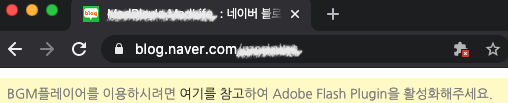
Most current projects use HTML5 players, and in legacy projects policy settings are often already configured,
so many developers never encounter policy files directly.
(Actually, knowing Flash itself is already uncommon.)
Still, until complete sunset, some Flash-based content remains.
So let’s review crossdomain.xml.
Policy File for External Domains
When an SWF communicates with a different domain, it needs a security policy file called crossdomain.xml.
This file allows SWF hosted on another domain to read data from your server.
See the flow below.
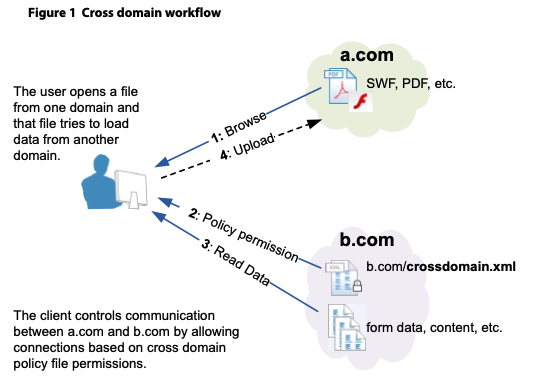
- (1):
a.comhas an SWF file. A user requests Flash-based content. - (2): The Flash content needs data from
b.com. So the file ona.comgets load permission fromb.com’s policy file. - (3): Because
b.comhas a policy file (specifically one that allowsa.com), data fromb.comcan be loaded. - (4): Now the SWF on
a.comcan access data onb.com.
In short, when a.com hosts an SWF and needs to load data from b.com (for example, images),
b.com must have crossdomain.xml at server root, such as b.com/crossdomain.xml.
How to Write the Policy File
Policy files are based on XML. Since the specification is defined, let’s review configuration options through an example.
<?xml version="1.0" encoding="UTF-8"?>
<!DOCTYPE cross-domain-policy SYSTEM "http://www.adobe.com/xml/dtds/cross-domain-policy.dtd">
<cross-domain-policy>
    <!-- Allow all domains. -->
    <allow-access-from domain="*"/>

    <!-- Allow requests from a.com. -->
    <allow-access-from domain="a.com"/>

    <!-- Also allow subdomains of a.com, such as b.a.com. -->
    <allow-access-from domain="*.a.com"/>

    <!-- Allow access from 123.123.123.123. -->
    <allow-access-from domain="123.123.123.123"/>

    <!-- Allow b.a.com domain. -->
    <allow-access-from domain="b.a.com"/>

    <!-- Allow a.com using HTTPS protocol. -->
    <allow-access-from domain="a.com" secure="true"/>

    <!-- Allow specific port for b.com access. -->
    <allow-access-from domain="a.com" to-ports="8080"/>
</cross-domain-policy>
secure Option
If the policy file is on an HTTPS server, and you want SWF from a non-HTTPS server to load data from that HTTPS server,
set secure to false.
allow-http-request-headers-from
This is another way to allow access.
<allow-access-from> grants permission for other domains to fetch data from your domain,
while <allow-http-request-headers-from> grants permission for other domains to send data into your domain via headers.
With the following configuration, all domains can send a header named Hello to the current domain.
<cross-domain-policy>
    <allow-http-request-headers-from domain="*" headers="Hello"/>
</cross-domain-policy>
site-control
This defines which cross-domain policy files are allowed.
You can think of it as permissions for policy files themselves, deciding whether alternate policy filenames or formats are allowed.
Before Flash 10, the default was all, but later it changed to master-only, allowing only the master policy file by default.
Major values are:
none: No policy file can be used anywhere on the target server, including this master file.master-only: Only this master policy file is allowed.by-content-type: (HTTP/HTTPS only) Only policy files served with Content-Typetext/x-cross-domain-policyare allowed.by-ftp-filename: (FTP only) Only policy files named crossdomain.xml (URLs ending with /crossdomain.xml) are allowed.all: All policy files on the target domain are allowed.