What is TCP/IP?
Before learning about TCP and UDP, we need to understand TCP/IP first.
It’s abbreviated as < Transfer Control Protocol / Internet Protocol >, called TCP/IP.
This is an internet standard protocol that promises to appropriately divide and transmit data exchanged between computers so that errors don’t occur when transmitting, and receive it and convert it back to original information.
It’s a compound word of TCP and IP, which play the most important roles among internet protocols, and handles data flow management, accuracy verification, and packet destination guarantee. (TCP handles data accuracy verification, and IP handles packet transmission to the destination)
TCP/IP is mapped to a conceptual model of 4 layers known as the DARPA model (derived from the name of the US information organization that developed TCP/IP). The 4 layers consist of Application, Transport, Internet, and Network Interface layers.
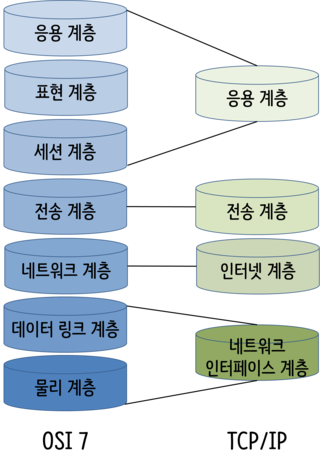
The Transport layer of TCP/IP above is a layer that checks errors of packets delivered by IP and handles controls like retransmission requests. It’s right here that two types of protocols, TCP and UDP, are used.
TCP vs UDP
Comparing with diagrams would be most clear and quick.
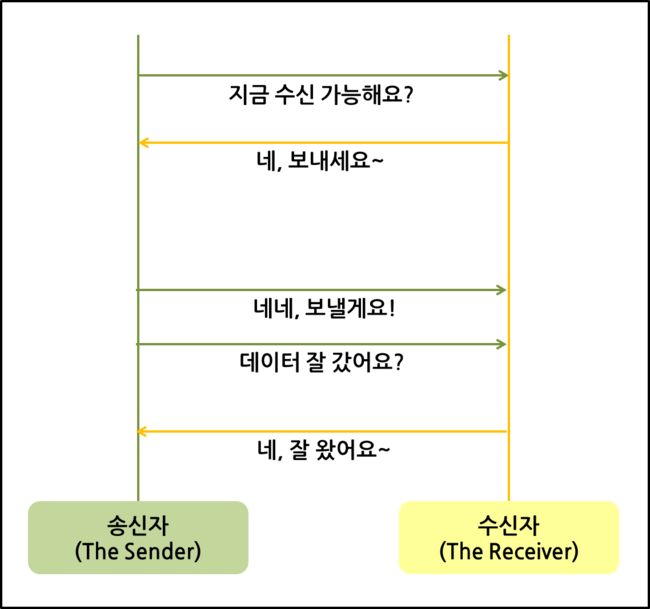
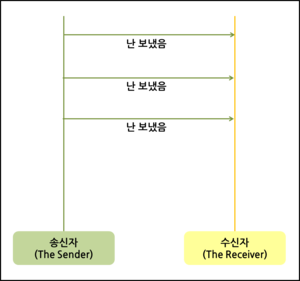
That is, TCP is used in applications requiring reliability, and UDP is used in applications that want to transmit simple data at high speed.
TCP Header Information
Examining in more detail. What happens when passing through TCP?
TCP that receives data from the application layer adds a TCP header and sends it to IP (Internet Protocol).
| Field | Size | Content |
|---|---|---|
| Sender’s port number | 16 | Port number of the application sending data |
| Receiver’s port number | 16 | Port number of the application receiving data |
| Sequence number | 32 | Sequence number specified by sender (based on byte count) |
| Acknowledgment number | 32 | Sequence number of data received successfully (based on byte count) |
| Data offset | 4 | Start position of data |
| Reserved field | 6 | Not used |
| Control bits | 6 | Control numbers like SYN, ACK, FIN |
| Window size | 16 | Size of data that can be received at receiver |
| Checksum | 16 | Used for data error checking |
| Urgent pointer | 16 | Position of data to process urgently |
| Field | Content |
|---|---|
| Sender/receiver port numbers | Port addresses assigned to sender/receiver processes at both ends of virtual circuit connected via TCP |
| Sequence Number | Sequence number specified by sender, increases based on number of bytes transmitted |
| ACK Number | Used to respond with the number of bytes properly received by receiving process |
| Data Offset | Expresses start position of data based on start position of TCP segment (size of TCP header) |
| Reserved | Reserved field for later use, not currently used |
| Flag Bit | Refer to additional explanation below |
| Window | Used when specifying buffer size of receive window |
| Checksum | For error detection of protocol header and data included in TCP segment |
| Urgent Pointer | For processing urgent data, valid only when URG flag bit is set |
| Type | Content |
|---|---|
| URG | Sets whether urgent pointer field is valid |
| ACK | Sets whether acknowledgment number field is valid |
| PSH | When immediately delivering data included in current segment to upper layer |
| RST | For resetting connection or responding to invalid segments |
| SYN | Connection setup request |
| FIN | Indicates intention to terminate connection when there’s no more data to transmit |
UDP Header Information
UDP that receives data from the application layer also adds a UDP header and sends it to IP (Internet Protocol).
| Field | Size | Content |
|---|---|---|
| Sender’s port number | 16 | Port number of the application sending data |
| Receiver’s port number | 16 | Port number of the application receiving data |
| Data length | 16 | Total length of UDP header and data |
| Checksum | 16 | Used for data error checking |
Unlike TCP header, UDP header feels lacking in included information.
UDP doesn’t care whether the receiver receives data or not. That is, it doesn’t guarantee reliability but is simple and fast.
In Summary…
Their common points are that they specify addresses using port numbers and that there’s a checksum for data error checking. Conversely, differences between TCP and UDP are as follows:
| TCP (Transfer Control Protocol) | UDP (User Datagram Protocol) |
|---|---|
| Communication possible only after connection succeeds (connection-oriented protocol) | Connectionless protocol (communication possible without connection) |
| Doesn’t distinguish data boundaries (Byte-Stream Service) | Distinguishes data boundaries (Datagram Service) |
| Reliable data transmission (data retransmission exists) | Unreliable data transmission (no data retransmission) |
| One-to-one (Unicast) communication | One-to-one, one-to-many (Broadcast), many-to-many (Multicast) communication |