Introduction to Querydsl
Querydsl is a framework that enables type-safe creation and management of HQL (Hibernate Query Language) queries. That is the official definition. A simpler interpretation is: “Querydsl lets you write queries in Java code.”
Why Querydsl?
Assume you use JPA. For simple queries, interface method signatures are usually enough. For example, a method like this to fetch articles whose title contains a specific string:
Article findByTitleContains(String title);
What about more complex queries? Instead of only filtering by title text, you now filter by the level of the user who wrote the article.
In that case, JPA built-in method naming is often insufficient, so you may consider native SQL. Below is a method that fetches articles written by users above a specific level.
@Query(value = "SELECT id, title, user_id FROM article WHERE user_id IN (SELECT id FROM user WHERE level > :level)", nativeQuery = true)
List<Article> findByLevel(String level);
Look at this native query again. Aside from readability, manually building query strings is error-prone.
Then what does this look like in Querydsl? Even before detailed usage, here is the equivalent Querydsl example.
public List<Article> findByUserLevel(String level) {
    QArticle article = QArticle.article;
    QUser user = QUser.user;

    return queryFactory.selectFrom(article)
        .where(
            article.userId.in(
                JPAExpressions
                    .select(user.id)
                    .from(user)
                    .where(user.level.gt(level))
            )
        )
        .fetch();
}
It is much more readable than the native query above. Even if total code volume increases.
Also, if you pass a parameter with wrong type, compilation fails and catches potential bugs earlier. In other words, query parameter type errors are detectable before runtime.
Now let’s move to actual Querydsl setup and usage.
Querydsl setup
This example was rewritten as of July 2021. Full source code is linked at the end.
Versions used in this example:
- Spring Boot: 2.5.0
- Gradle 7.1.1
- Querydsl: 4.4.0
- Lombok: 1.18.18
Gradle settings
First, declare dependencies in build.gradle.
Some unrelated dependencies are omitted; only Querydsl-related items are listed.
// ... omitted

dependencies {
    // ... omitted

    implementation "com.querydsl:querydsl-core:${queryDslVersion}"
    implementation "com.querydsl:querydsl-jpa:${queryDslVersion}"

    /*
     * Required to address `NoClassDefFoundError`.
     * Note: name changed from javax -> jakarta.
     */
    annotationProcessor(
            "jakarta.persistence:jakarta.persistence-api",
            "jakarta.annotation:jakarta.annotation-api",
            "com.querydsl:querydsl-apt:${queryDslVersion}:jpa")
}

sourceSets {
    main {
        java {
            srcDirs = ["$projectDir/src/main/java", "$projectDir/build/generated"]
        }
    }
}

// ... omitted
Querydsl Config
Next, configure Querydsl.
The jpaQueryFactory bean defined here is used in repositories.
import javax.persistence.EntityManager;
import javax.persistence.PersistenceContext;

import org.springframework.context.annotation.Bean;
import org.springframework.context.annotation.Configuration;

import com.querydsl.jpa.impl.JPAQueryFactory;

@Configuration
public class QuerydslConfig {
	@PersistenceContext
	private EntityManager entityManager;

	@Bean
	public JPAQueryFactory jpaQueryFactory() {
		return new JPAQueryFactory(entityManager);
	}
}
How to use Querydsl
Setup is complete. Now let’s use Querydsl.
Define entity classes
Define entity classes mapped to article and user tables.
@Getter
@Entity
@Table(name = "article")
public class Article {
	@Id
	private Integer id;
	@Column(name = "user_id")
	private Integer userId;
	private String title;
}
@Getter
@Entity
@Table(name = "user")
public class User {
	@Id
	private Integer id;
	private String name;
	private String level;
}
Generate Q classes
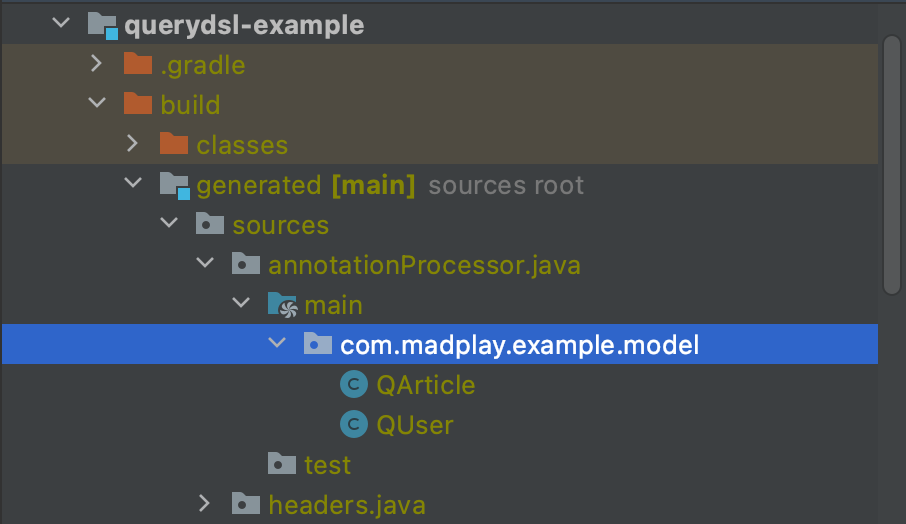
During compilation, Querydsl generates Q classes from entities. Queries are written based on those generated classes.
To generate Q classes, compile source via Gradle.
Run build task (which includes compile) or run compileJava if your goal is only Q-class generation.
After execution, Q classes appear in build output like below.
Define repository
Next, create repository layers where queries are written/executed. Both JPA interface methods and Querydsl methods are used.
First, define signatures for Querydsl methods.
The naming follows ~RepositoryCustom.
/**
 * Declare signatures for Querydsl queries here,
 * then implement in `~RepositoryImpl`.
 */
public interface ArticleRepositoryCustom {
	List<Article> findByLevelUsingQuerydsl(String level);
}
Then implement behavior using those signatures.
Use JPAQueryFactory from QuerydslConfig to build/execute query.
Method suffix ~UsingQuerydsl is arbitrary; in team projects, follow your convention.
/**
 * Query implementation using Querydsl.
 */
@Repository
@RequiredArgsConstructor
public class ArticleRepositoryImpl implements ArticleRepositoryCustom {

	private final JPAQueryFactory queryFactory;

	public List<Article> findByLevelUsingQuerydsl(String level) {
		// use Q classes
		QArticle article = QArticle.article;
		QUser user = QUser.user;

		return queryFactory.selectFrom(article)
			.where(
				article.userId.in(
					JPAExpressions
						.select(user.id)
						.from(user)
						.where(user.level.gt(level))
				)
			)
			.fetch();
	}
}
Custom repositories must follow naming conventions.
Without extra settings, suffix ~Impl is required for Spring to find implementation.
You can verify this from internal code in spring-data classes RepositoryConfigurationSourceSupport and AnnotationRepositoryConfigurationSource.
Finally, define the repository interface to use JPA methods together.
findByLevel below is added for comparison with Querydsl.
public interface ArticleRepository extends JpaRepository<Article, Integer>, ArticleRepositoryCustom {
	@Query(value = "SELECT * FROM article WHERE user_id IN (SELECT id FROM user WHERE level > :level)", nativeQuery = true)
	List<Article> findByLevel(String level);
}
Test
Now write a simple test to run the code.
@SpringBootTest
class ExampleApplicationTests {

	@Autowired
	private ArticleRepository articleRepository;

	@Test
	void testGetArticleList() {
		// Native Query
		List<Article> articleList = articleRepository.findByLevel("1");

		System.out.println("--------------------------------------------------");

		// Querydsl
		List<Article> articleListByQuerydsl = articleRepository.findByLevelUsingQuerydsl("1");

		Assertions.assertEquals(articleList.size(), articleListByQuerydsl.size());
	}
}
Add SQL logging settings to verify generated Querydsl SQL.
spring.jpa.properties.hibernate.show_sql=true # print executed SQL
spring.jpa.properties.hibernate.format_sql=true # pretty format SQL
Run the test. Printed queries show both queries are equivalent in result.
Hibernate:
    SELECT
        id,
        title,
        user_id
    FROM
        article
    WHERE
        user_id IN (
            SELECT
                id
            FROM
                user
            WHERE
                level > ?
        )
--------------------------------------------------
Hibernate:
    select
        article0_.id as id1_0_,
        article0_.title as title2_0_,
        article0_.user_id as user_id3_0_
    from
        article article0_
    where
        article0_.user_id in (
            select
                user1_.id
            from
                user user1_
            where
                user1_.level>?
        )
Dynamic query
Another strong point of Querydsl is dynamic query composition.
You can define conditional expressions in code as below.
If a parameter is absent and null reaches where, that condition is skipped.
public List<Article> searchArticle(String title, Integer userId) {
    return queryFactory.selectFrom(article)
        .where(titleContains(title), userIdEq(userId))
        .fetch();
}

private BooleanExpression titleContains(String title) {
    return StringUtils.isNotBlank(title) ? article.title.contains(title) : null;
}

private BooleanExpression userIdEq(Integer userId) {
    return userId != null ? article.userId.eq(userId) : null;
}
Closing
When using JPA, native queries appear when built-in features are not enough. But as shown above, native query strings are easy to mistype and harder to read.
With Querydsl, you use IDE autocomplete and catch type/syntax issues at compile time. Dynamic query handling is also straightforward. Applicability still depends on project context, so choose based on your project needs.
Example source code
All source code in this post is in the repository below.
- GitHub repository: https://github.com/madplay/querydsl-example