When Subagents Aren’t Enough
A subagent operates under a structure where the main agent delegates sub-tasks and gathers the results. For most tasks, this suffices. However, as the scope of the work scales up, limitations begin to appear.
Subagents cannot converse directly with one another. An agent modifying the frontend has no way to ask the backend agent, “Has the API response format changed?” It must pass through the main agent. When a single main agent shoulders all delegation and coordination, it becomes a bottleneck itself. Because everything runs within the context window of a single session, the burden on the main agent increases proportionally as the task expands.
Agent Teams cross this boundary. It is a structure where multiple Claude Code instances run in their own independent sessions, collaborating through a shared task list and messaging system.
Agent Teams is an experimental feature. As of March 2026, it is available in Claude Code v2.1.32 or higher, and it is disabled by default. The API or operational mechanics are subject to change.
How Are Subagents and Agent Teams Different?
Both share the notion of “dividing work,” but their structures are fundamentally different.
| Aspect | Subagent | Agent Team |
|---|---|---|
| Session Scope | Runs within the main session | Each teammate has an independent session |
| Communication | Returns results only to main | Direct messaging and broadcasting among teammates |
| Task Management | Main agent directly delegates | Autonomous allocation via shared task list |
| Context | Dependent on main window | Independent windows for each |
| Activation | Built-in by default | Experimental feature, requires activation |
If a subagent is a model of “one person doing multiple jobs consecutively,” an Agent Team is a model of “multiple people doing their own jobs and conversing when necessary.”
Structure of an Agent Team
Team Lead and Teammates
An Agent Team comprises a Team Lead and Teammates.
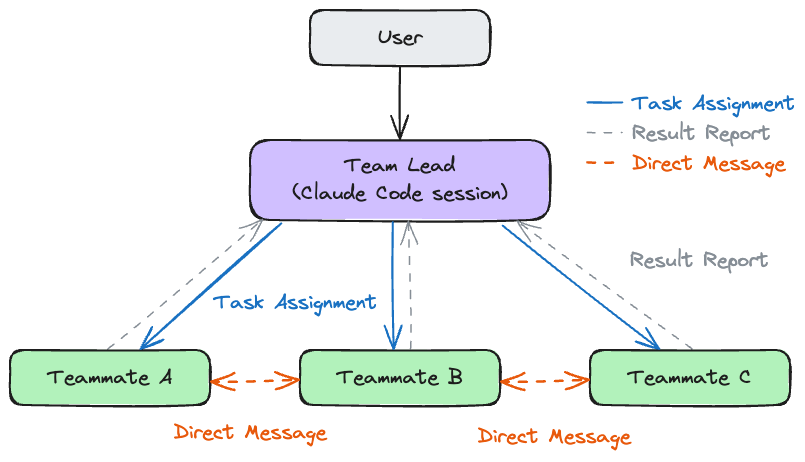
The Team Lead is the session that creates the team and adds members. It plays a coordinating role by distributing work, checking teammates’ statuses, and consolidating results. The Team Lead is exactly the Claude Code session the user directly converses with.
Teammates are independent Claude Code instances generated by the Lead. There is no hard limit on headcount, but considering coordination overhead and token costs, 3 to 5 members are practical. Each teammate has its own context window, tool access privileges, and work domain. While project contexts (CLAUDE.md, MCP servers) are automatically shared, the Lead’s conversational history is not passed down. If there is task context that must be communicated to a teammate, it must be explicitly included in the task description or message.
The Team Lead is fixed for the duration of the session. Swapping the Lead for another teammate or promoting a teammate to Lead is not supported.
Task List
At the heart of an Agent Team’s collaboration lies the shared task list. Tasks transition through three states.
pending → in progress → completed
The Lead can create tasks and assign them to specific teammates, or leave them unassigned so teammates can pick them up autonomously. Dependencies between tasks can also be established, enforcing order by unlocking subsequent tasks only when preceding tasks are complete. File locking prevents race conditions where multiple teammates attempt to grab the same task simultaneously.
Properly sizing tasks is crucial. If chopped too finely, coordination overhead eclipses the actual work; if made too large, a teammate might work alone for too long and drift off course. A single function, a single test file, or a single review item are practically suitable units based on experience.
Messages and Broadcasts
Communication between teammates within an Agent Team occurs in two ways.
A direct message is a 1:1 message sent to one specific teammate. It is used to convey precise information, such as “I added a totalPrice field to the API response, so please reflect it on the frontend.”
A broadcast is a message dispatched to all teammates simultaneously. It is fit for general announcements, like “The coding conventions have changed, so please review them.” However, since a broadcast consumes tokens equal to the number of teammates, it is best not to overuse it.
When a teammate finishes all assigned tasks, it enters an idle state, triggering an automatic notification to the Lead. The Lead monitors these notifications to assign new tasks or check the teammate’s outcomes.
Forming a Team
Enabling the Experimental Feature
To use Agent Teams, environment variables must be configured.
Configuring via settings.json is the cleanest approach.
{
  "env": {
    "CLAUDE_CODE_EXPERIMENTAL_AGENT_TEAMS": "1"
  }
}
You can also set it directly as a shell environment variable.
export CLAUDE_CODE_EXPERIMENTAL_AGENT_TEAMS=1
Creating a Team and Assigning Roles
Once enabled, you simply request the team formation using natural language in your Claude Code session. Freely dictate roles, headcount, and work scopes, and the Lead will generate teammates and assign roles.
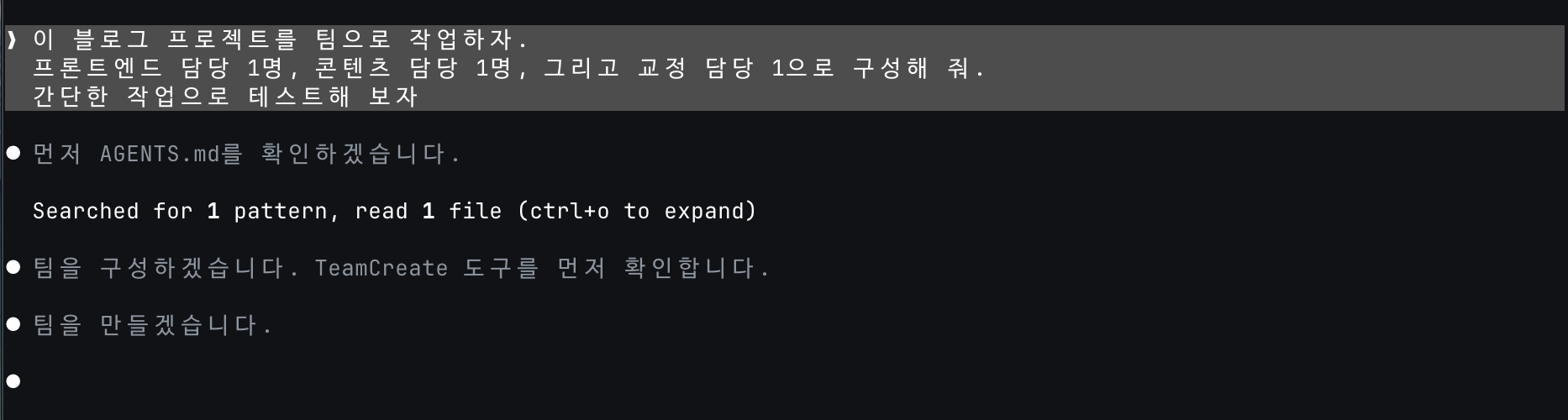
Models can also be assigned per teammate. Simply say, “Each teammate uses Sonnet.” The Lead can automatically determine the appropriate team size, or the user can manually designate the number of members.
Interface Configuration
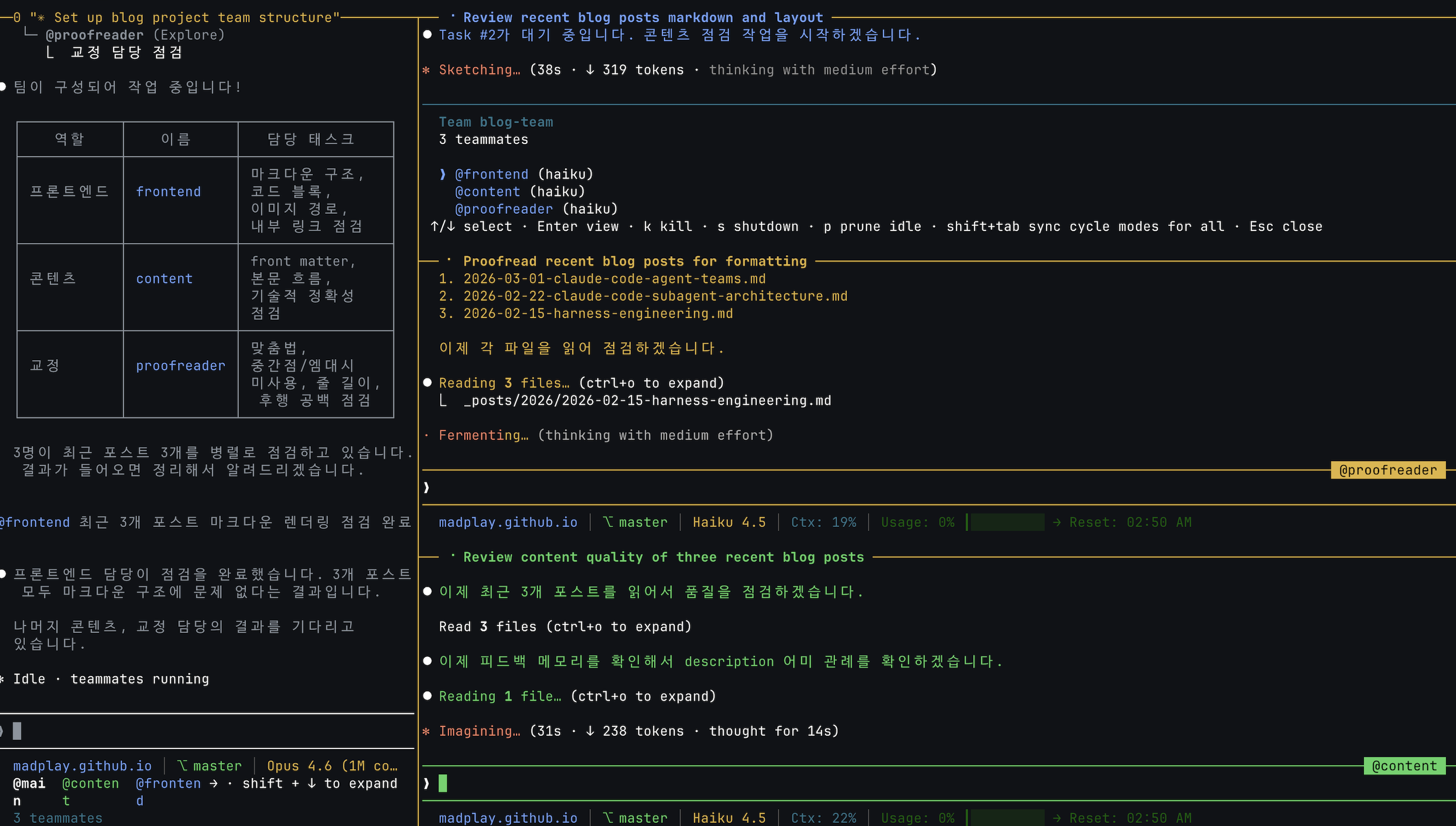
Depending on how you wish to view multiple teammates working concurrently, there are two modes.
In-process mode (Default) runs all teammates within a single terminal. Use Shift+Down to cycle through teammates, and Enter to open a specific teammate’s session. Ctrl+T toggles the task list. It functions in any terminal without additional configuration.
Split-screen mode uses tmux or iTerm2 to open separate panels for each teammate. It is intuitive as it allows you to observe every teammate’s progress simultaneously. Clicking a panel lets you chat directly with that teammate. However, it requires tmux or iTerm2 and is not supported in the VS Code integrated terminal or Windows Terminal.
{
  "teammateMode": "tmux"
}
If specifying the mode every time feels cumbersome, simply set it to "auto". It automatically utilizes the split screen when inside a tmux session and operates in in-process mode otherwise.
Costs and Limitations
The greatest cost of an Agent Team is tokens. Because a single teammate represents an independent Claude Code session, the session cost multiplies by the number of teammates. Three teammates roughly consume more than triple the tokens of a single session. Add broadcast messages, and the costs climb even higher.
There are also areas yet to be refined.
- Cases where a teammate fails to update a task’s completion status may occur, causing subsequent tasks to stall. You must manually check and update the status.
- Restoring a session containing in-process teammates via
/resumedoes not recover the teammate states. The Lead might attempt to message non-existent teammates, so caution is advised. - When terminating a team in tmux split-screen mode, sessions may linger. They must be cleaned up manually via
tmux kill-session. - Nesting within teams is unsupported. A teammate cannot build another team beneath it.
When Are Subagents Enough, and When Are Teams Necessary?
Not all multi-agent tasks necessitate an Agent Team. There are three main criteria for judgment.
- Is inter-agent communication necessary? There is no channel for subagents to exchange messages with one another. If agents need to trade information mid-task, a team is suitable.
- Do sessions need to run independently for long periods? Subagents are spawned within the main session and return results upon completion. If each agent must work independently over extended periods and communicate only when needed, a team structure is superior.
- Is the cost justified by the benefits? Since token costs scale proportionally with the number of teammates, the scale and complexity of the task must justify that cost. Modifying a few files is rational to approach with subagents; developing cross-layer features or conducting large-scale refactoring is rational to approach as a team.
For the majority of daily tasks, subagents alone are sufficient. Adopting teams purely on the assumption that “more agents equal faster results” will likely leave you shocked by the coordination overhead and token costs. If the scope can be resolved via single-agent workflows and subagents, there is no pressing reason to assemble a team—even more so given the instability of experimental features.
Conversely, if interfaces must be aligned continuously while modifying multiple layers simultaneously, and the expertise for each domain needs separating, the team structure creates a meaningful difference. Ultimately, it is the nature of the task rather than the capability of the tool that should dictate the choice.