Java Security APIs
Java has provided security features for a long time through JCA (Java Cryptography Architecture) and JCE (Java Cryptography Extension). These APIs let developers apply cryptographic mechanisms without implementing low-level primitives from scratch.
In this article, we review major Java crypto concepts and implement encryption/decryption examples.
Java Cryptography Architecture
JCA is a core security framework available since JDK 1.1. It includes APIs for digital signatures, message digests, certificate handling, encryption/decryption, and key generation/management.
JCA is exposed through java.security.
Common classes include MessageDigest, Signature, and SecureRandom.
It also uses providers (for example Sun, SunRsaSign, SunJCE) that implement algorithms.
JCA is built around these principles:
Implementation independence
Applications do not need to implement security algorithms directly. They call standard Java APIs, and providers supply concrete implementations. Multiple independent providers can coexist.
Implementation interoperability
Providers and applications are not tightly coupled to one another. Different implementations can interoperate, for example by sharing keys or validating signatures across providers.
Algorithm extensibility
Java ships widely used security services out of the box. If newer standards are needed, additional services can be integrated.
Java Cryptography Extension
JCE extends JCA capabilities. It was distributed internationally after 2000 and became part of JDK by default from JDK 1.4.
JCE lives in javax.crypto, with classes such as Cipher, KeyGenerator, and SecretKey.
Java includes SunJCE by default, and third-party libraries such as BouncyCastle are also commonly used.
Key Classes and Features
Provider
JCA’s implementation independence is enabled by provider-based architecture. A cryptographic provider implements one or more security services, such as signature algorithms and key conversion.
Each provider has a name and metadata that lists supported services and algorithms. When you request a specific algorithm, JCA resolves an implementation from provider metadata.
md = MessageDigest.getInstance("SHA-256");
md = MessageDigest.getInstance("SHA-256", "ProviderC"); // example
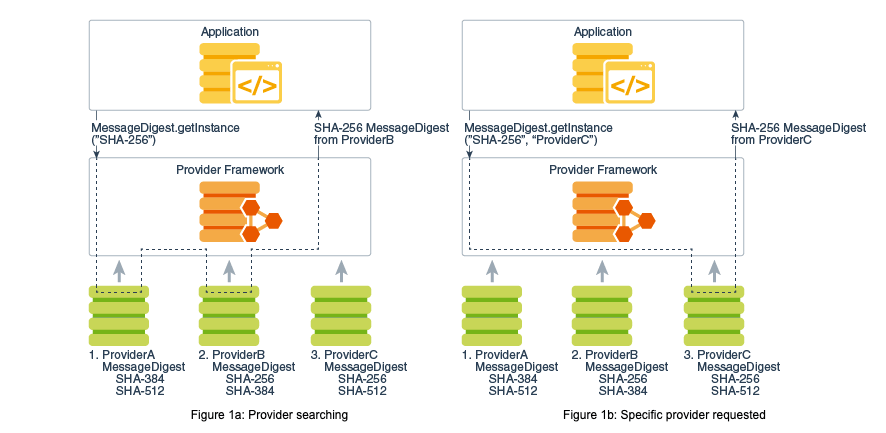
In practice, avoid hardcoding a specific provider unless required, because available providers can differ by runtime environment. JCA also provides APIs to inspect installed providers and supported services.
Cipher
javax.crypto.Cipher represents a cryptographic transformation.
It encrypts/decrypts data using a transformation string:
Cipher cipher = Cipher.getInstance("AES/CBC/PKCS5Padding");
The transformation is:
- algorithm
- mode of operation
- padding
Algorithm
Algorithms can be grouped into one-way and two-way types. Two-way algorithms include symmetric-key and asymmetric-key cryptography.
- One-way: hash functions such as SHA-256, MD5 (cannot decrypt back to plaintext)
- Asymmetric-key: different keys for encryption and decryption (for example RSA)
- Symmetric-key: same key for both directions (for example AES)
Mode of operation
Block ciphers operate on fixed-size blocks. For variable-length data, data is segmented into blocks, and a mode defines how blocks are chained/processed.
In CBC mode, each plaintext block is XORed with the previous ciphertext block before encryption, so identical plaintext blocks produce different ciphertext blocks.
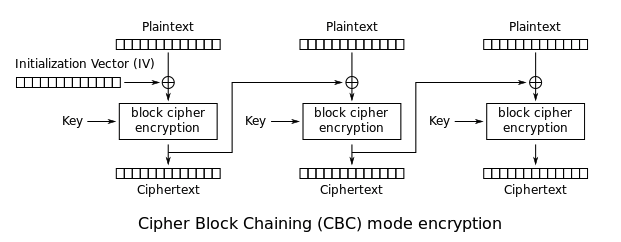
The first block uses an Initialization Vector (IV) because no previous ciphertext block exists.
Padding
Block ciphers such as AES and DES require plaintext length to align with block size (DES: 8 bytes, AES: 16 bytes). If not aligned, padding fills the last block.
Common schemes include fixed-size PKCS5 and variable-size PKCS7. In Java transformation strings, PKCS5 naming is often used for both.
So AES/CBC/PKCS5Padding is normal in Java,
and using PKCS7Padding directly can lead to NoSuchAlgorithmException
depending on provider mapping.
KeyGenerator
Encryption/decryption needs keys.
Java provides key generation via javax.crypto.KeyGenerator.
SecretKey secretKey = KeyGenerator.getInstance("AES").generateKey();
You can set key size, provide SecureRandom,
or specify key bytes directly in a provider-independent way.
// specify key size and random source
KeyGenerator keyGenerator = KeyGenerator.getInstance("AES");
SecureRandom secureRandom = new SecureRandom();
keyGenerator.init(128, secureRandom);
SecretKey secretKey = keyGenerator.generateKey();

// specify key directly
SecretKeySpec key = new SecretKeySpec("MyKey".getBytes("UTF-8"), "AES");
Generated keys are passed to Cipher.init(...) to initialize cipher instances.
Encryption and Decryption Examples
Based on the concepts above, implement utility-style static methods. Use AES and include IV creation.
public AESCryptoUtil {

    /**
     * Return key
     */
    public static SecretKey getKey() throws Exception {
        KeyGenerator keyGenerator = KeyGenerator.getInstance("AES");
        keyGenerator.init(128);
        SecretKey secretKey = keyGenerator.generateKey();
        return secretKey;
    }

    /**
     * Return initialization vector
     */
    public static IvParameterSpec getIv() {
        byte[] iv = new byte[16];
        new SecureRandom().nextBytes(iv);
        return new IvParameterSpec(iv);
    }

    // encryption/decryption methods below
}
String encryption/decryption
Create key and IV, instantiate Cipher, initialize mode,
and call doFinal.
Use Cipher.ENCRYPT_MODE for encryption and Cipher.DECRYPT_MODE for decryption.
public class AESCryptoUtil {

	// ... getKey, getIv omitted

	public static String encrypt(String specName, SecretKey key, IvParameterSpec iv,
		String plainText) throws Exception {
		Cipher cipher = Cipher.getInstance(specName);
		cipher.init(Cipher.ENCRYPT_MODE, key, iv);
		byte[] encrypted = cipher.doFinal(plainText.getBytes(StandardCharsets.UTF_8));
		return new String(Base64.getEncoder().encode(encrypted));
	}

	public static String decrypt(String specName, SecretKey key, IvParameterSpec iv,
		String cipherText) throws Exception {
		Cipher cipher = Cipher.getInstance(specName);
		cipher.init(Cipher.DECRYPT_MODE, key, iv); // mode differs
		byte[] decrypted = cipher.doFinal(Base64.getDecoder().decode(cipherText));
		return new String(decrypted, StandardCharsets.UTF_8);
	}
}
Test code:
String plainText = "Hello, MadPlay!";

SecretKey key = AESCryptoUtil.getKey();
IvParameterSpec ivParameterSpec = AESCryptoUtil.getIv();
String specName = "AES/CBC/PKCS5Padding";

String encryptedText = AESCryptoUtil.encrypt(specName, key, ivParameterSpec, plainText);
String decryptedText = AESCryptoUtil.decrypt(specName, key, ivParameterSpec, encryptedText);

System.out.println("cipherText: " + encryptedText);
System.out.println("plainText: " + decryptedText);
Output:
cipherText: vzyKxKufZmKdtSUwVKWJYg==
plainText: Hello, MadPlay!
File encryption/decryption
File encryption/decryption follows the same crypto flow, with additional file I/O streams.
public static void encryptFile(String specName, SecretKey key, IvParameterSpec iv,
        File inputFile, File outputFile) throws Exception {

    Cipher cipher = Cipher.getInstance(specName);
    cipher.init(Cipher.ENCRYPT_MODE, key, iv);

    try (FileOutputStream output = new FileOutputStream(outputFile);
        CipherOutputStream cipherOutput = new CipherOutputStream(output, cipher)) {

        String data = Files.lines(inputFile.toPath()).collect(Collectors.joining("\n"));
	    cipherOutput.write(data.getBytes(StandardCharsets.UTF_8));
    }
}

public static void decryptFile(String specName, SecretKey key, IvParameterSpec iv,
        File encryptedFile, File decryptedFile) throws Exception {

    Cipher cipher = Cipher.getInstance(specName);
    cipher.init(Cipher.DECRYPT_MODE, key, iv);

    try (
        CipherInputStream cipherInput = new CipherInputStream(new FileInputStream(encryptedFile), cipher);
        InputStreamReader inputStream = new InputStreamReader(cipherInput);
        BufferedReader reader = new BufferedReader(inputStream);
        FileOutputStream fileOutput = new FileOutputStream(decryptedFile)) {

        StringBuilder sb = new StringBuilder();
        String line;
        while ((line = reader.readLine()) != null) {
            sb.append(line);
        }
	    fileOutput.write(sb.toString().getBytes(StandardCharsets.UTF_8));
    }
}
Test code:
SecretKey key = AESCryptoUtil.getKey();
String specName = "AES/CBC/PKCS5Padding";
IvParameterSpec ivParameterSpec = AESCryptoUtil.getIv();

File inputFile = Paths.get("input.txt").toFile();
File encryptedFile = new File("encrypted.txt");
File decryptedFile = new File("decrypted.txt");
AESCryptoUtil.encryptFile(specName, key, ivParameterSpec, inputFile, encryptedFile);
AESCryptoUtil.decryptFile(specName, key, ivParameterSpec, encryptedFile, decryptedFile);

// verify result
String inputText = Files.lines(Paths.get("input.txt"), StandardCharsets.UTF_8)
    .collect(Collectors.joining("\n"));
String encryptedText = Files.lines(Paths.get("decrypted.txt"), StandardCharsets.UTF_8)
    .collect(Collectors.joining("\n"));

System.out.println("input: " + inputText);
System.out.println("decrypted: " + encryptedText);
Closing
This post reviewed major Java security APIs and practical crypto implementation patterns. Beyond code snippets, we covered algorithm categories, mode of operation, and padding basics, which are critical to avoid incorrect crypto usage.
Even so, this content is only a small part of practical cryptography. For deeper and authoritative details, refer to official documents.
Some images used in this article are referenced from Oracle documentation. For broader security API guidance, see the link below.